
блог о программах и веб-сервисах
среда, 9 апреля 2014 г.
Intel Turbo Boost: включить или отключить?
Intel Turbo Boost — это технология саморазгона процессора на время сильной нагрузки. Разгон происходит за счет использования малозагруженных ядер. Поэтому наибольший эффект заметен в однопоточных приложениях, но и на многопоточных тоже заметен. Подробнее технология описана в википедии.
А как проверить, есть Turbo Boost в процессоре или нет?
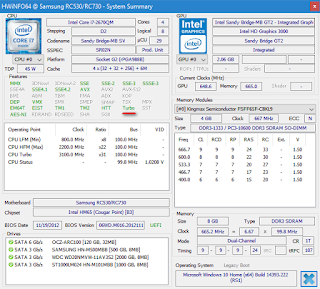
Запустите HWiNFO (как им пользоваться смотрите здесь и здесь). В окне System summary в панели Features надпись Turbo будет гореть зеленым — это значит он есть в процессоре.
И реально разгоняет?
Да, эффект реально заметен. Чуть ниже есть таблички для сравнения с включенным и отключенным турбо бустом.
Хочу проверить его в деле
Турбобуст разгоняет процессор только при нагрузке. Откройте любую программу, показывающую частоту процессора (CPU-Z, Speccy, OpenHardwareMonitor, тот же HWiNFO). Теперь попробуйте, например, архивировать большой файл. Вы увидите, что частота процессора заметно увеличилась.
Если этого не происходит, то попробуйте поставить план электропитания "Высокая производительность" и отключить, если есть, фирменные утилиты для экономии энергии.
А какие минусы?
На мой взгляд, главный минус — это повышенное потребление энергии и температура на время разгона. Впрочем, температура не должна подняться выше TDP.
Так и включать или отключать?
Температура заметно повышается только во время продолжительных и сильных нагрузок на процессор (игры, кодирование аудиовидео). Если у вас такие нагрузки есть:
- Если у вас ноутбук или комп со слабой системой охлаждения, то вам имеет смысл отключить турбо буст.
- Если же у вас с охлаждением все в порядке, то отключать не нужно.
Если вы используете ноутбук или комп для серфинга, офиса и редко сильно нагружаете его, то вам не нужно отключать турбо буст, потому что во время коротких нагрузок температура не сильно повышается, и можно не волноваться об этом. Зато с саморазгоном приложения (например архиватор) будут работать быстрее.
Если у вас ноутбук, вы его много используете в автономном режиме, то для увеличения времени на одной зарядке, вам лучше отключить турбо буст. Все-таки энергию он потребляет.
Замерять температуру (а так же частоту и другие параметры) удобно с помощью бесплатной программы Open Hardware Monitor. Можно отображать на графике: отмечаете флажками нужные значения и открываете график: View —> Show Plot.
Как включить Turbo Boost?
По-умолчанию он уже включен.
Как отключить Turbo Boost?
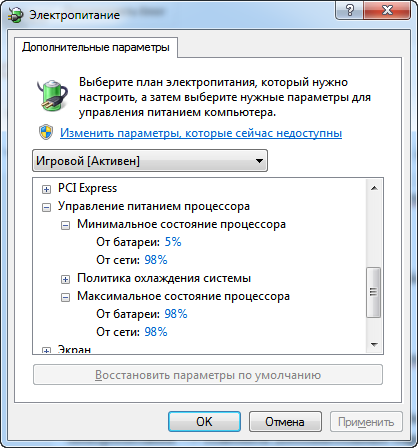
Для отключения нужно в текущем плане энергопитания изменить максимальное состояние процессора.
Панель управления —> Оборудование и звук —> Электропитание —> Настройка плана электропитания —> Изменить дополнительные параметры питания —> Управление питанием процессора:
- Максимальное состояние процессора: от сети и батареи поставить значение ниже 100 (для отключения достаточно поставить 99).
- Минимальное состояние процессора: так же проверьте, чтобы значение было ниже 100.
То есть, если стоит 100 — турбо буст включен. Если меньше 100 — выключен.
Что вообще такое "максимальное состояние процессора"?
Если стоит 100%, то процессор работает на полную мощность. Если 50%, то вполовину.
Хочу отключить турбо буст, какое значение мне поставить?
Как я уже писал, для отключения будет достаточно 99%.
Т.к. у меня ноутбук, то мне важно, чтобы он не перегревался. Небольшими экспериментами я определил для себя, что 98% будет оптимально по критерию производительностьтемпература.
Далее идут результаты тестирования.
Мой процессор — Intel Core i7-2670QM с частотой 2.20 ГГц. Максимальное состояние процессора в 98% уменьшает стабильную частоту до 1996 МГц (т.е. выше не поднимается).
Specifications
Compare Intel® Products
Essentials
- Product Collection Legacy IntelВ® Coreв„ў Processors
- Code Name Products formerly Ivy Bridge
- Vertical Segment Desktop
- Processor Number i5-3570
- Off Roadmap No
- Status Discontinued
- Launch Date Q2’12
- Lithography 22 nm
Performance
- # of Cores 4
- # of Threads 4
- Processor Base Frequency 3.40 GHz
- Max Turbo Frequency 3.80 GHz
- Cache 6 MB IntelВ® Smart Cache
- Bus Speed 5 GT/s
- TDP 77 W
Supplemental Information
- Embedded Options Available No
- Datasheet View now
Memory Specifications
- Max Memory Size (dependent on memory type) 32 GB
- Memory Types DDR3 1333/1600
- Max # of Memory Channels 2
- Max Memory Bandwidth 25.6 GB/s
- ECC Memory Supported ‡ No
Processor Graphics
- Processor Graphics ‡ Intel® HD Graphics 2500
- Graphics Base Frequency 650 MHz
- Graphics Max Dynamic Frequency 1.15 GHz
- IntelВ® Quick Sync Video Yes
- IntelВ® InTruв„ў 3D Technology Yes
- IntelВ® Flexible Display Interface (IntelВ® FDI) Yes
- IntelВ® Clear Video HD Technology Yes
- # of Displays Supported ‡ 3
- Device ID 0x152
Expansion Options
- PCI Express Revision 3.0
- PCI Express Configurations ‡ up to 1×16, 2×8, 1×8 & 2×4
Package Specifications
- Sockets Supported FCLGA1155
- Max CPU Configuration 1
- Thermal Solution Specification 2011D
- TCASE 67.4
- Package Size 37.5mm x 37.5mm
Advanced Technologies
- Intel® Turbo Boost Technology ‡ 2.0
- Intel® vPro™ Platform Eligibility ‡ Yes
- Intel® Hyper-Threading Technology ‡ No
- Intel® Virtualization Technology (VT-x) ‡ Yes
- Intel® Virtualization Technology for Directed I/O (VT-d) ‡ Yes
- Intel® VT-x with Extended Page Tables (EPT) ‡ Yes
- IntelВ® TSX-NI No
- Intel® 64 ‡ Yes
- Instruction Set 64-bit
- Instruction Set Extensions IntelВ® SSE4.1, IntelВ® SSE4.2, IntelВ® AVX
- Idle States Yes
- Enhanced Intel SpeedStepВ® Technology Yes
- Thermal Monitoring Technologies Yes
- Intel® Identity Protection Technology ‡ Yes
Security & Reliability
- IntelВ® AES New Instructions Yes
- Secure Key Yes
- Intel® Trusted Execution Technology ‡ Yes
- Execute Disable Bit ‡ Yes
- Anti-Theft Technology Yes
Ordering and Compliance
Retired and discontinued
Boxed IntelВ® Coreв„ў i5-3570 Processor (6M Cache, up to 3.80 GHz) FC-LGA12C
- MM# 922461
- Spec Code SR0T7
- Ordering Code BX80637I53570
- Shipping Media BOX
- Stepping N0
IntelВ® Coreв„ў i5-3570 Processor (6M Cache, up to 3.80 GHz) FC-LGA12C, Tray
- MM# 921371
- Spec Code SR0T7
- Ordering Code CM8063701093103
- Shipping Media TRAY
- Stepping N0
Trade compliance information
- ECCN 5A992C
- CCATS G077159
- US HTS 8542310001
PCN/MDDS Information
SR0T7
- 922461 PCN | MDDS
- 921371 PCN | MDDS
Compatible Products
Find Compatible Desktop Boards
Find boards compatible with the IntelВ® Coreв„ў i5-3570 Processor in the Intel Desktop Compatibility Tool
IntelВ® 7 Series Chipsets
IntelВ® 6 Series Chipsets
Downloads and Software
Launch Date
The date the product was first introduced.
Lithography
Lithography refers to the semiconductor technology used to manufacture an integrated circuit, and is reported in nanometer (nm), indicative of the size of features built on the semiconductor.
# of Cores
Cores is a hardware term that describes the number of independent central processing units in a single computing component (die or chip).
# of Threads
A Thread, or thread of execution, is a software term for the basic ordered sequence of instructions that can be passed through or processed by a single CPU core.
Processor Base Frequency
Processor Base Frequency describes the rate at which the processor’s transistors open and close. The processor base frequency is the operating point where TDP is defined. Frequency is measured in gigahertz (GHz), or billion cycles per second.
Max Turbo Frequency
Max turbo frequency is the maximum single core frequency at which the processor is capable of operating using IntelВ® Turbo Boost Technology and, if present, IntelВ® Thermal Velocity Boost. Frequency is measured in gigahertz (GHz), or billion cycles per second.
Cache
CPU Cache is an area of fast memory located on the processor. IntelВ® Smart Cache refers to the architecture that allows all cores to dynamically share access to the last level cache.
Bus Speed
A bus is a subsystem that transfers data between computer components or between computers. Types include front-side bus (FSB), which carries data between the CPU and memory controller hub; direct media interface (DMI), which is a point-to-point interconnection between an Intel integrated memory controller and an Intel I/O controller hub on the computer’s motherboard; and Quick Path Interconnect (QPI), which is a point-to-point interconnect between the CPU and the integrated memory controller.
Thermal Design Power (TDP) represents the average power, in watts, the processor dissipates when operating at Base Frequency with all cores active under an Intel-defined, high-complexity workload. Refer to Datasheet for thermal solution requirements.
Embedded Options Available
Embedded Options Available indicates products that offer extended purchase availability for intelligent systems and embedded solutions. Product certification and use condition applications can be found in the Production Release Qualification (PRQ) report. See your Intel representative for details.
Max Memory Size (dependent on memory type)
Max memory size refers to the maximum memory capacity supported by the processor.
Memory Types
IntelВ® processors come in four different types: a Single Channel, Dual Channel, Triple Channel, and Flex Mode.
Max # of Memory Channels
The number of memory channels refers to the bandwidth operation for real world application.
Max Memory Bandw >Max Memory bandwidth is the maximum rate at which data can be read from or stored into a semiconductor memory by the processor (in GB/s).
ECC Memory Supported ‡
ECC Memory Supported indicates processor support for Error-Correcting Code memory. ECC memory is a type of system memory that can detect and correct common kinds of internal data corruption. Note that ECC memory support requires both processor and chipset support.
Processor Graphics ‡
Processor Graphics indicates graphics processing circuitry integrated into the processor, providing the graphics, compute, media, and display capabilities. IntelВ® HD Graphics, Irisв„ў Graphics, Iris Plus Graphics, and Iris Pro Graphics deliver enhanced media conversion, fast frame rates, and 4K Ultra HD (UHD) video. See the IntelВ® Graphics Technology page for more information.
Graphics Base Frequency
Graphics Base frequency refers to the rated/guaranteed graphics render clock frequency in MHz.
Graphics Max Dynamic Frequency
Graphics max dynamic frequency refers to the maximum opportunistic graphics render clock frequency (in MHz) that can be supported using IntelВ® HD Graphics with Dynamic Frequency feature.
IntelВ® InTruв„ў 3D Technology
IntelВ® InTruв„ў 3D Technology provides stereoscopic 3-D Blu-ray* playback in full 1080p resolution over HDMI* 1.4 and premium audio.
IntelВ® Flexible Display Interface (IntelВ® FDI)
The IntelВ® Flexible Display Interface is an innovative path for two independently controlled channels of integrated graphics to be displayed.
IntelВ® Clear V >IntelВ® Clear Video HD Technology, like its predecessor, IntelВ® Clear Video Technology, is a suite of image decode and processing technologies built into the integrated processor graphics that improve video playback, delivering cleaner, sharper images, more natural, accurate, and vivid colors, and a clear and stable video picture. IntelВ® Clear Video HD Technology adds video quality enhancements for richer color and more realistic skin tones.
PCI Express Revision
PCI Express Revision is the version supported by the processor. Peripheral Component Interconnect Express (or PCIe) is a high-speed serial computer expansion bus standard for attaching hardware devices to a computer. The different PCI Express versions support different data rates.
PCI Express Configurations ‡
PCI Express (PCIe) Configurations describe the available PCIe lane configurations that can be used to link the PCH PCIe lanes to PCIe devices.
Sockets Supported
The socket is the component that provides the mechanical and electrical connections between the processor and motherboard.
Thermal Solution Specification
Intel Reference Heat Sink specification for proper operation of this processor.
TCASE
Case Temperature is the maximum temperature allowed at the processor Integrated Heat Spreader (IHS).
Intel® Turbo Boost Technology ‡
IntelВ® Turbo Boost Technology dynamically increases the processor’s frequency as needed by taking advantage of thermal and power headroom to give you a burst of speed when you need it, and increased energy efficiency when you don’t.
Intel® vPro™ Platform Eligibility ‡
The Intel vProВ® platform is a set of hardware and technologies used to build business computing endpoints with premium performance, built-in security, modern manageability and platform stability.
Learn more about Intel vProВ®
Intel® Hyper-Threading Technology ‡
IntelВ® Hyper-Threading Technology (IntelВ® HT Technology) delivers two processing threads per physical core. Highly threaded applications can get more work done in parallel, completing tasks sooner.
Intel® Virtualization Technology (VT-x) ‡
Intel® Virtualization Technology (VT-x) allows one hardware platform to function as multiple “virtual” platforms. It offers improved manageability by limiting downtime and maintaining productivity by isolating computing activities into separate partitions.
Intel® Virtualization Technology for Directed I/O (VT-d) ‡
IntelВ® Virtualization Technology for Directed I/O (VT-d) continues from the existing support for IA-32 (VT-x) and ItaniumВ® processor (VT-i) virtualization adding new support for I/O-device virtualization. Intel VT-d can help end users improve security and reliability of the systems and also improve performance of I/O devices in virtualized environments.
Intel® VT-x with Extended Page Tables (EPT) ‡
IntelВ® VT-x with Extended Page Tables (EPT), also known as Second Level Address Translation (SLAT), provides acceleration for memory intensive virtualized applications. Extended Page Tables in IntelВ® Virtualization Technology platforms reduces the memory and power overhead costs and increases battery life through hardware optimization of page table management.
IntelВ® TSX-NI
IntelВ® Transactional Synchronization Extensions New Instructions (IntelВ® TSX-NI) are a set of instructions focused on multi-threaded performance scaling. This technology helps make parallel operations more efficient via improved control of locks in software.
Intel® 64 ‡
IntelВ® 64 architecture delivers 64-bit computing on server, workstation, desktop and mobile platforms when combined with supporting software.В№ Intel 64 architecture improves performance by allowing systems to address more than 4 GB of both virtual and physical memory.
Instruction Set
An instruction set refers to the basic set of commands and instructions that a microprocessor understands and can carry out. The value shown represents which Intel’s instruction set this processor is compatible with.
Instruction Set Extensions
Instruction Set Extensions are additional instructions which can increase performance when the same operations are performed on multiple data objects. These can include SSE (Streaming SIMD Extensions) and AVX (Advanced Vector Extensions).
>Idle States (C-states) are used to save power when the processor is idle. C0 is the operational state, meaning that the CPU is doing useful work. C1 is the first idle state, C2 the second, and so on, where more power saving actions are taken for numerically higher C-states.
Enhanced Intel SpeedStepВ® Technology
Enhanced Intel SpeedStepВ® Technology is an advanced means of enabling high performance while meeting the power-conservation needs of mobile systems. Conventional Intel SpeedStepВ® Technology switches both voltage and frequency in tandem between high and low levels in response to processor load. Enhanced Intel SpeedStepВ® Technology builds upon that architecture using design strategies such as Separation between Voltage and Frequency Changes, and Clock Partitioning and Recovery.
Thermal Monitoring Technologies
Thermal Monitoring Technologies protect the processor package and the system from thermal failure through several thermal management features. An on-die Digital Thermal Sensor (DTS) detects the core’s temperature, and the thermal management features reduce package power consumption and thereby temperature when required in order to remain within normal operating limits.
Intel® Identity Protection Technology ‡
Intel® Identity Protection Technology is a built-in security token technology that helps provide a simple, tamper-resistant method for protecting access to your online customer and business data from threats and fraud. Intel® IPT provides a hardware-based proof of a unique user’s PC to websites, financial institutions, and network services; providing verification that it is not malware attempting to login. Intel® IPT can be a key component in two-factor authentication solutions to protect your information at websites and business log-ins.
IntelВ® AES New Instructions
IntelВ® AES New Instructions (IntelВ® AES-NI) are a set of instructions that enable fast and secure data encryption and decryption. AES-NI are valuable for a wide range of cryptographic applications, for example: applications that perform bulk encryption/decryption, authentication, random number generation, and authenticated encryption.
Secure Key
IntelВ® Secure Key consists of a digital random number generator that creates truly random numbers to strengthen encryption algorithms.
Intel® Trusted Execution Technology ‡
IntelВ® Trusted Execution Technology for safer computing is a versatile set of hardware extensions to IntelВ® processors and chipsets that enhance the digital office platform with security capabilities such as measured launch and protected execution. It enables an environment where applications can run within their own space, protected from all other software on the system.
Execute Disable Bit ‡
Execute Disable Bit is a hardware-based security feature that can reduce exposure to viruses and malicious-code attacks and prevent harmful software from executing and propagating on the server or network.
Anti-Theft Technology
Intel® Anti-Theft Technology (Intel® AT) helps keep your laptop safe and secure in the event that it’s ever lost or stolen. Intel® AT requires a service subscription from an Intel® AT–enabled service provider.
Boxed Processor
Intel Authorized Distributors sell Intel processors in clearly marked boxes from Intel. We refer to these processors as boxed processors. They typically carry a three-year warranty.
Tray Processor
Intel ships these processors to Original Equipment Manufacturers (OEMs), and the OEMs typically pre-install the processor. Intel refers to these processors as tray or OEM processors. Intel doesn’t provide direct warranty support. Contact your OEM or reseller for warranty support.
More support options for IntelВ® Coreв„ў i5-3570 Processor (6M Cache, up to 3.80 GHz)
Need more help?
Give Feedback
Give Feedback
Our goal is to make the ARK family of tools a valuable resource for you. Please submit your comments, questions, or suggestions here. You will receive a reply within 2 business days.
Your comments have been sent. Thank you for your feedback.
Your personal information will be used to respond to this inquiry only. Your name and email address will not be added to any mailing list, and you will not receive email from Intel Corporation unless requested. Clicking вЂSubmit’ confirms your acceptance of the Intel Terms of Use and understanding of the Intel Privacy Policy.
All information provided is subject to change at any time, without notice. Intel may make changes to manufacturing life cycle, specifications, and product descriptions at any time, without notice. The information herein is provided "as-is" and Intel does not make any representations or warranties whatsoever regarding accuracy of the information, nor on the product features, availability, functionality, or compatibility of the products listed. Please contact system vendor for more information on specific products or systems.
Intel classifications are for informational purposes only and consist of Export Control Classification Numbers (ECCN) and Harmonized Tariff Schedule (HTS) numbers. Any use made of Intel classifications are without recourse to Intel and shall not be construed as a representation or warranty regarding the proper ECCN or HTS. Your company as an importer and/or exporter is responsible for determining the correct classification of your transaction.
Refer to Datasheet for formal definitions of product properties and features.
‡ This feature may not be available on all computing systems. Please check with the system vendor to determine if your system delivers this feature, or reference the system specifications (motherboard, processor, chipset, power supply, HDD, graphics controller, memory, BIOS, drivers, virtual machine monitor-VMM, platform software, and/or operating system) for feature compatibility. Functionality, performance, and other benefits of this feature may vary depending on system configuration.
Max Turbo Frequency refers to the maximum single-core processor frequency that can be achieved with IntelВ® Turbo Boost Technology. See www.intel.com/technology/turboboost/ for more information.
System and Maximum TDP is based on worst case scenarios. Actual TDP may be lower if not all I/Os for chipsets are used.
“Announced” SKUs are not yet available. Please refer to the Launch Date for market availability.
Processors that support 64-bit computing on IntelВ® architecture require an Intel 64 architecture-enabled BIOS.
Intel processor numbers are not a measure of performance. Processor numbers differentiate features within each processor family, not across different processor families. See http://www.intel.com/content/www/us/en/processors/processor-numbers.html for details.
Some products can support AES New Instructions with a Processor Configuration update, in particular, i7-2630QM/i7-2635QM, i7-2670QM/i7-2675QM, i5-2430M/i5-2435M, i5-2410M/i5-2415M. Please contact OEM for the BIOS that includes the latest Processor configuration update.
Тип материала Информация о продукции и документация
Идентификатор статьи 000007359
Последняя редакция 12.10.2018
Щелкните или тему, чтобы узнать подробности:
Что такое технология Intel® Turbo Boost и как она работает?
Технология Intel Turbo Boost позволяет автоматически выработать ядро процессора быстрее, чем отмеченная частота. Процессор должен работать с максимальным энергопотреблением, тактовой частотой и характеристикой, установленными для тепловой модели (РАСЧЕТНАЯ мощность). Это приводит к повышению производительности как для приложений с одним, так и для многопоточных приложений. Нет необходимости устанавливать какое-либо программное обеспечение или приложение для поддержки технологии Intel® Turbo Boost.
Сколько версий технологии Intel® Turbo Boost?
Технология Intel Turbo Boost имеет две версии. Технология Intel Turbo Boost впервые была представлена в процессорах 2008 с процессорами Intel® Core™ i7-9xx. Технология Intel Turbo Boost v 2.0 была представлена в 2011 с процессорами Intel® Core™ i5-2xxx и i7-2xxx для настольных ПК. Версия 2,0 работает так же, как и первая, и была оптимизирована для новой микроархитектуры, впервые представленной в момент.
Какие семейства процессоров поддерживают технологию Intel® Turbo Boost?
- Процессоры Intel® Core™ i7 для мобильных и настольных ПК
- Процессоры Intel® Core™ i5 для мобильных и настольных ПК
- Процессоры Intel® Core™ серии X
Какая операционная система поддерживается технологией Intel® Turbo Boost?
Технология Intel Turbo Boost — это процессорная технология, которая не зависит от операционной системы.
Как проверить, поддерживает ли процессорыintel® технологию Intel® Turbo Boost?
Перейдите на страницу «спецификация продукции » и введите номер процессора в поле «Спецификация поиска». На странице «процессор» и в разделе « производительность» найдите поле «Максимальная тактовая частотав режиме Turbo».
Какие факторы влияют на работу технологии Intel® Turbo Boost?
Эта операция зависит от запаса, доступного в одном или нескольких ядрах. Время, в течение которого система переходит в режим Turbo Boost, зависит от рабочей нагрузки, среды и дизайна платформы.
Как технология Intel® Turbo Boost активирована или отключена?
Технология Intel Turbo Boost активирована по умолчанию. Вы можете отключить или включить эту технологию с помощью коммутатора в BIOS. Нет других настраиваемых параметров пользователя, которые могут изменить работу технологии Intel Turbo Boost. После включения технология Intel Turbo Boost работает автоматически под управлением операционной системы.
Поддерживает ли моя материнская плата технологию Intel® Turbo Boost?
Технология Intel Turbo Boost — это процессорная технология. Убедитесь, что у вас есть процессор, поддерживаемый технологией Turbo Boost Intel. Как правило, поставщики системных плат для настольных ПК поддерживают технологию Intel Turbo Boost по умолчанию. Как правило, вы можете включить или отключиться с помощью коммутатора в BIOS системной платы для настольных ПК. Обратитесь к поставщику системной платы за опциями BIOS, чтобы включить или отключить технологию Intel Turbo Boost.
Является ли частота Turbo одинаковой для всех активных ядер в процессоре?
Можно ли включить или отключить технологию Intel® Turbo Boost за счет ядра?
Технология Intel Turbo Boost — это процессорная технология, которую невозможно включить или отключить с помощью ядра. Если одно ядро активно, технология активирована.
Могу ли я определить максимальную частоту Intel® Turbo Boost?
Невозможно указать максимальную тактовую частоту для функции процессора. Максимальная тактовая частота является автоматическим и зависит от рабочих условий.
Будет ли технология Intel® Turbo Boost заставить систему работать слишком активно?
Технология Intel® Turbo Boost не приводит к чрезмерной замедлению системы, поскольку производительность процессора, температуры и ограничений в соответствии с максимальным количеством устройств охлаждения (РАСЧЕТНАЯ мощность) не нагревается. Иногда, когда работает технология Intel® Turbo Boost, системный вентилятор может работать на более высокой скорости, что является нормальным при увеличении тактовой частоты процессора. Убедитесь в том, что процессор работает с энергопотреблением, температурой и характеристикой, установленными для теплового дизайна (РАСЧЕТНАЯ мощность).
Как я могу узнать, работает ли технология Intel® Turbo Boost?
Существует несколько инструментов, выпущенных корпорацией Intel, и других инструментов, которые помогут оценить тактовую частоту процессора при частоте Turbo Boost. В этой статье вы найдете наиболее подходящие для вас.
В чем разница между технологией Intel® Turbo Boost и монитором Intel® Turbo Boost Technology?
Технология Intel Turbo Boost — это процессорная технология Intel®. Монитор технологии Intel Turbo Boost — это инструмент, демонстрирующий технологию Intel Turbo Boost в действии.
Как оценить максимальную частоту Turbo Boost для моего процессора?
Если задать количество ядер одной в BIOS и запустить утилиту идентификации процессоров Intel®, в нем показана Максимальная тактовая частота в режиме Turbo Boost. Убедитесь в том, что вы переустановили коммутатор в BIOS, чтобы вновь активировать все ядра.
Насколько важна интеграция систем и проектирование систем в отношении технологии Intel® Turbo Boost?
Технология Intel Turbo Boost работает, когда процессор работает с энергопотреблением, температурой и характеристикой, ограничивающими возможности теплового дизайна (РАСЧЕТНАЯ мощность). Правильная системная интеграция и тепловая схема позволяют воспользоваться преимуществами технологии Intel Turbo Boost.
Где я могу узнать больше о технологии Intel® Turbo Boost?
Для получения дополнительной информации посетите страницу технологии Intel® Turbo Boost .


