
Summary: in this tutorial, you will learn how to use the output parameters to return data back to the calling program.
Creating output parameters
To create an output parameter for a stored procedure, you use the following syntax:
A stored procedure can have many output parameters. In addition, the output parameters can be in any valid data type e.g., integer, date, and varying character.
For example, the following stored procedure finds products by model year and returns the number of products via the @product_count output parameter:
In this stored procedure:
First, we created an output parameter named @product_count to store the number of products found:
Second, after the SELECT statement, we assigned the number of rows returned by the query( @@ROWCOUNT ) to the @product_count parameter.
Once you execute the CREATE PROCEDURE statement above, the uspFindProductByModel stored procedure is compiled and saved in the database catalog.
If everything is fine, SQL Server issues the following output:
Calling stored procedures with output parameters
To call a stored procedure with output parameters, you follow these steps:
- First, declare variables to hold the value returned by the output parameters
- Second, use these variables in the stored procedure call.
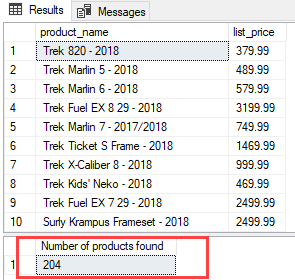
For example, the following statement executes the uspFindProductByModel stored procedure:
The following picture shows the output:
In this tutorial, you have learned how to use the output parameter to pass data from the stored procedure back to the calling program.
ОБЛАСТЬ ПРИМЕНЕНИЯ:  SQL Server База данных SQL Azure Azure Synapse Analytics (хранилище данных SQL) Parallel Data Warehouse APPLIES TO: SQL Server Azure SQL Database Azure Synapse Analytics (SQL DW) Parallel Data Warehouse
Существует три способа возврата данных из процедуры в вызывающую программу: результирующие наборы, параметры вывода и коды возврата. There are three ways of returning data from a procedure to a calling program: result sets, output parameters, and return codes. Этот раздел содержит сведения по всем трем способам. This topic provides information on the three approaches.
Возврат данных с помощью результирующих наборов Returning Data Using Result Sets
Если включить инструкцию SELECT в тело хранимой процедуры (но не SELECT. INTO или INSERT. SELECT), строки, указанные инструкцией SELECT, будут отправляться непосредственно клиенту. If you include a SELECT statement in the body of a stored procedure (but not a SELECT . INTO or INSERT . SELECT), the rows specified by the SELECT statement will be sent directly to the client. Для больших результирующих наборов выполнение хранимой процедуры не перейдет к следующей инструкции, пока результирующий набор не будет полностью передан клиенту. For large result sets the stored procedure execution will not continue to the next statement until the result set has been completely sent to the client. Для небольших результирующих наборов результаты будут буферизированы для возврата клиенту, а выполнение продолжится. For small result sets the results will be spooled for return to the client and execution will continue. Если при выполнении хранимой процедуры запускаются несколько таких инструкций SELECT, клиенту отправляется несколько результирующих наборов. If multiple such SELECT statements are run during the exeuction of the stored proceudre, multiple result sets will be sent to the client. Такое поведение также применяется к вложенным пакетам TSQL, вложенным хранимым процедурам и пакетам TSQL верхнего уровня. This behavior also applies to nested TSQL batches, nested stored procedures and top-level TSQL batches.
Примеры возврата данных с помощью результирующего набора Examples of Returning Data Using a Result Set
Приведенный ниже пример показывает хранимую процедуру, которая возвращает значения LastName и SalesYTD для всех строк SalesPerson, которые также отображаются в представлении vEmployee. The following example shows a stored procedure that returns the LastName and SalesYTD values for all SalesPerson rows that also appear in the vEmployee view.
Возврат данных с помощью выходного параметра Returning Data Using an Output Parameter
Процедура может возвращать текущее значение параметра в вызываемой программе при завершении работы при указании ключевого слова OUTPUT для параметра в определении процедуры. If you specify the OUTPUT keyword for a parameter in the procedure definition, the procedure can return the current value of the parameter to the calling program when the procedure exits. Чтобы сохранить значение параметра в переменной, которая может быть использована в вызываемой программе, при выполнении процедуры вызываемая программа должна использовать ключевое слово OUTPUT. To save the value of the parameter in a variable that can be used in the calling program, the calling program must use the OUTPUT keyword when executing the procedure. Дополнительные сведения о том, какие типы данных могут использоваться в качестве выходных параметров, см. в разделе CREATE PROCEDURE (Transact-SQL). For more information about what data types can be used as output parameters, see CREATE PROCEDURE (Transact-SQL).
Примеры выходного параметра Examples of Output Parameter
Следующий пример представляет процедуру с входным и выходным параметрами. The following example shows a procedure with an input and an output parameter. Параметр @SalesPerson получает входное значение, указанное вызывающей программой. The @SalesPerson parameter would receive an input value specified by the calling program. Инструкция SELECT использует значение, переданное входному параметру для получения верного значения SalesYTD . The SELECT statement uses the value passed into the input parameter to obtain the correct SalesYTD value. Инструкция SELECT также присваивает это значение выходному параметру @SalesYTD , который возвращает значение вызывающей программе при завершении процедуры. The SELECT statement also assigns the value to the @SalesYTD output parameter, which returns the value to the calling program when the procedure exits.
В следующем примере вызывается процедура, которая была создана в первом примере и сохраняет выходное значение, возвращенное вызванной процедурой в переменной @SalesYTD , являющейся локальной в вызывающей программе. The following example calls the procedure created in the first example and saves the output value returned from the called procedure in the @SalesYTD variable, which is local to the calling program.
Входные значения также могут быть указаны для параметров OUTPUT при выполнении процедуры. Input values can also be specified for OUTPUT parameters when the procedure is executed. Это позволяет хранимой процедуре получать значение из вызываемой программы, изменять его или выполнять операции с этим значением, а затем возвращать новое значение вызываемой программе. This allows the procedure to receive a value from the calling program, change or perform operations with the value, and then return the new value to the calling program. В предыдущем примере переменной @SalesYTDBySalesPerson может быть присвоено значение прежде, чем программа вызовет процедуру Sales.uspGetEmployeeSalesYTD . In the previous example, the @SalesYTDBySalesPerson variable can be assigned a value before the program calls the Sales.uspGetEmployeeSalesYTD procedure. Эта инструкция передает значение переменной @SalesYTDBySalesPerson выходному параметру @SalesYTD . The execute statement would pass the @SalesYTDBySalesPerson variable value into the @SalesYTD OUTPUT parameter. Далее в тексте процедуры значение можно использовать для вычислений, формирующих новое значение. Then in the procedure body, the value could be used for calculations that generate a new value. Новое значение передается обратно из процедуры через выходной параметр, обновляя значение в переменной @SalesYTDBySalesPerson при завершении процедуры. The new value would be passed back out of the procedure through the OUTPUT parameter, updating the value in the @SalesYTDBySalesPerson variable when the procedure exits. Часто это называется «возможностью передачи по ссылке». This is often referred to as "pass-by-reference capability."
Если при вызове процедуры указано ключевое слово OUTPUT для параметра, а параметр не определен при помощи OUTPUT в определении процедуры, выдается сообщение об ошибке. If you specify OUTPUT for a parameter when you call a procedure and that parameter is not defined by using OUTPUT in the procedure definition, you get an error message. Однако процедуру можно выполнить с выходными параметрами, не указывая OUTPUT при выполнении процедуры. However, you can execute a procedure with output parameters and not specify OUTPUT when executing the procedure. Сообщение об ошибке не будет выдаваться, но нельзя будет использовать выходное значение в вызываемой программе. No error is returned, but you cannot use the output value in the calling program.
Использование типа данных Cursor в выходных параметрах Using the Cursor Data Type in OUTPUT Parameters
Transact-SQL Transact-SQL в процедурах только выходные (OUTPUT) параметры могут иметь тип данных cursor . procedures can use the cursor data type only for OUTPUT parameters. Если тип данных cursor указан для параметра, то как ключевое слово VARYING, так и ключевое слов OUTPUT должны быть указаны для этого параметра в определении процедуры. If the cursor data type is specified for a parameter, both the VARYING and OUTPUT keywords must be specified for that parameter in the procedure definition. Параметр может быть указан только как выходной, однако если в объявлении параметра указано ключевое слово VARYING, типом данных должен быть cursor , при этом также следует указать ключевое слово OUTPUT. A parameter can be specified as only OUTPUT but if the VARYING keyword is specified in the parameter declaration, the data type must be cursor and the OUTPUT keyword must also be specified.
Тип данных cursor не может быть связан с переменными приложения через интерфейсы API баз данных, таких как OLE DB, ODBC, ADO и DB-Library. The cursor data type cannot be bound to application variables through the database APIs such as OLE DB, ODBC, ADO, and DB-Library. Поскольку выходные параметры должны быть привязаны прежде, чем приложение сможет выполнить хранимую процедуру, хранимые процедуры с выходными параметрами типа cursor не могут быть вызваны из функций API базы данных. Because OUTPUT parameters must be bound before an application can execute a procedure, procedures with cursor OUTPUT parameters cannot be called from the database APIs. Эти процедуры могут быть вызваны из пакетов на языке Transact-SQL Transact-SQL , процедур или триггеров, только если выходная переменная типа cursor присвоена локальной переменной Transact-SQL Transact-SQL cursor языка типа . These procedures can be called from Transact-SQL Transact-SQL batches, procedures, or triggers only when the cursor OUTPUT variable is assigned to a Transact-SQL Transact-SQL local cursor variable.
Правила для выходных параметров курсора Rules for Cursor Output Parameters
Следующие правила относятся к выходным параметрам типа cursor при выполнении процедуры: The following rules pertain to cursor output parameters when the procedure is executed:
Для курсора последовательного доступа в результирующий набор курсора будут возвращены только строки с текущей позиции курсора до конца курсора. Текущая позиция курсора определяется при окончании выполнения процедуры. Например: For a forward-only cursor, the rows returned in the cursor’s result set are only those rows at and beyond the position of the cursor at the conclusion of the procedure execution, for example:
Непрокручиваемый курсор открыт в процедуре на результирующем наборе по имени RS из 100 строк. A nonscrollable cursor is opened in a procedure on a result set named RS of 100 rows.
Процедура выбирает первые 5 строк результирующего набора RS. The procedure fetches the first 5 rows of result set RS.
Процедура возвращает результат участнику. The procedure returns to its caller.
Результирующий набор RS, возвращенный участнику, состоит из строк с 6 по 100 из набора RS, и курсор в участнике позиционирован перед первой строкой RS. The result set RS returned to the caller consists of rows from 6 through 100 of RS, and the cursor in the caller is positioned before the first row of RS.
Для курсора последовательного доступа, если курсор позиционирован перед первой строкой после завершения хранимой процедуры, весь результирующий набор будет возвращен к вызывающему пакету, процедуре или триггеру. For a forward-only cursor, if the cursor is positioned before the first row when the procedure exits, the entire result set is returned to the calling batch, procedure, or trigger. После возврата позиция курсора будет установлена перед первой строкой. When returned, the cursor position is set before the first row.
Для курсора последовательного доступа, если курсор позиционирован за концом последней строки после завершения хранимой процедуры, вызывающему пакету, процедуре или триггеру будет возвращен пустой результирующий набор. For a forward-only cursor, if the cursor is positioned beyond the end of the last row when the procedure exits, an empty result set is returned to the calling batch, procedure, or trigger.
Пустой результирующий набор отличается от значения NULL. An empty result set is not the same as a null value.
Для прокручиваемого курсора все строки в результирующем наборе будут возвращены к вызывающему пакету, процедуре или триггеру после выполнения процедуры. For a scrollable cursor, all the rows in the result set are returned to the calling batch, procedure, or trigger when the procedure exits. При возврате позиция курсора остается в позиции последней выборки, выполненной в процедуре. When returned, the cursor position is left at the position of the last fetch executed in the procedure.
Для любого типа курсора, если курсор закрыт, вызывающему пакету, процедуре или триггеру будет возвращено значение NULL. For any type of cursor, if the cursor is closed, then a null value is passed back to the calling batch, procedure, or trigger. Это же произойдет в случае, если курсор присвоен параметру, но этот курсор никогда не открывался. This will also be the case if a cursor is assigned to a parameter, but that cursor is never opened.
Закрытое состояние имеет значение только во время возврата. The closed state matters only at return time. Например, можно при выполнении процедуры закрыть курсор, снова открыть его позже в процедуре и возвратить этот результирующий набор курсора в вызывающий пакет, процедуру или триггер. For example, it is valid to close a cursor part of the way through the procedure, to open it again later in the procedure, and return that cursor’s result set to the calling batch, procedure, or trigger.
Примеры выходных параметров курсора Examples of Cursor Output Parameters
В следующем примере создается процедура, которая указывает выходной параметр @currency_cursor , используя тип данных cursor. In the following example, a procedure is created that specified an output parameter, @currency_cursor using the cursor data type. Процедура затем будет вызвана из пакета. The procedure is then called in a batch.
Сначала создайте процедуру, которая объявляет и затем открывает курсор в таблице Currency. First, create the procedure that declares and then opens a cursor on the Currency table.
Затем выполните пакет, который объявляет локальную переменную курсора, выполняет процедуру, присваивающую курсор локальной переменной, и затем выбирает строки из курсора. Next, execute a batch that declares a local cursor variable, executes the procedure to assign the cursor to the local variable, and then fetches the rows from the cursor.
Возврат данных с использованием кода возврата Returning Data Using a Return Code
Процедура может возвращать целочисленное значение, называемое кодом возврата, чтобы указать состояние выполнения процедуры. A procedure can return an integer value called a return code to indicate the execution status of a procedure. Код возврата для процедуры указывается при помощи инструкции RETURN. You specify the return code for a procedure using the RETURN statement. Как и выходные параметры, при выполнении процедуры код возврата необходимо сохранить в переменной, чтобы использовать это значение в вызывающей программе. As with OUTPUT parameters, you must save the return code in a variable when the procedure is executed in order to use the return code value in the calling program. Например, переменная @result типа данных int используется для хранения кода возврата из процедуры my_proc , например: For example, the assignment variable @result of data type int is used to store the return code from the procedure my_proc , such as:
Коды возврата часто применяются в блоках управления потоком процедур для присвоения кода возврата каждой из возможных ошибок. Return codes are commonly used in control-of-flow blocks within procedures to set the return code value for each possible error situation. Чтобы выяснить, произошла ли во время выполнения инструкции ошибка, запустите функцию @@ERROR после инструкции Transact-SQL Transact-SQL . You can use the @@ERROR function after a Transact-SQL Transact-SQL statement to detect whether an error occurred during the execution of the statement. До появления обработки ошибок TRY/CATCH/THROW в TSQL для определения успеха или сбоя хранимых процедур иногда требовались коды возврата. Before the introduction of TRY/CATCH/THROW error handling in TSQL return codes were sometimes required to determine the success or failure of stored procedures. Хранимые процедуры должны всегда выдавать сообщение при возникновении ошибки (которое при необходимости создается с помощью THROW/RAISERROR), не полагаясь в этом на код возврата. Stored Procedures should always indicate failure with an error (generated with THROW/RAISERROR if necessary), and not rely on a return code to indicate the failure. Кроме того, следует избегать использования кода возврата для возврата данных приложения. Also you should avoid using the return code to return application data.
Примеры кодов возврата Examples of Return Codes
В следующем примере показана процедура usp_GetSalesYTD с обработкой ошибок, устанавливающей специальные значения кода возврата для различных ошибок. The following example shows the usp_GetSalesYTD procedure with error handling that sets special return code values for various errors. В следующей таблице показано целое число, которое назначается процедурой каждой возможной ошибке, и соответствующее значение каждого числа. The following table shows the integer value that is assigned by the procedure to each possible error, and the corresponding meaning for each value.
| Значения кодов возврата Return code value | Значение Meaning |
|---|---|
| 0 0 | Выполнено успешно. Successful execution. |
| 1 1 | Требуемое значение параметра не указано. Required parameter value is not specified. |
| 2 2 | Требуемое значение параметра не допустимо. Specified parameter value is not valid. |
| 3 3 | Произошла ошибка при получении значения продаж. Error has occurred getting sales value. |
| 4 4 | Найдено значение NULL для продаж данного менеджера. NULL sales value found for the salesperson. |
Следующий пример создает программу обработки кодов возврата, которые возвращаются процедурой usp_GetSalesYTD . The following example creates a program to handle the return codes that are returned from the usp_GetSalesYTD procedure.
How to use Output Parameters in SQL Stored Procedure?. Or How to use Output Parameters to return a Value or message from a SQL Stored Procedure with example. I suggest you to refer Introduction to Stored Procedure article to understand the basics of the stored procedure.
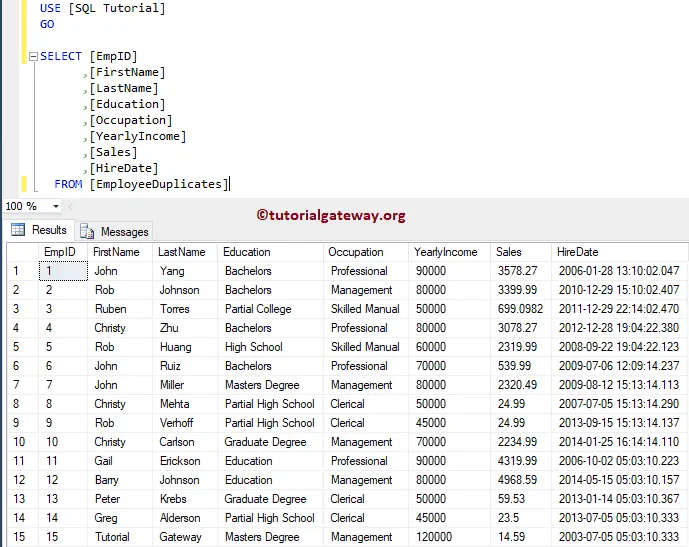
To output value from the stored procedure, you have to declare a variable along with OUT or OUTPUT keyword. For this SQL Stored Procedure Output Parameters demonstration, We are going to use the below-shown SQL table
Output Parameters in SQL Stored Procedure Example 1
In this example, we show you how to use Output Parameters in a Stored procedure. Please see the Select Stored Procedure article to understand how to write Select statement ins >
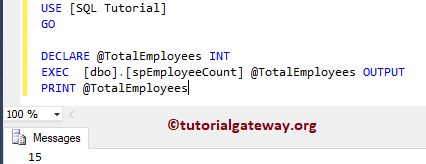
The below statement will create a Stored procedure of Name spEmployeeCount. And we declare a variable called @EmployeeCount of integer Type along with OUTPUT keyword. Within the procedure, we are using the COUNT to find the number of employees in the Employee Duplicate table. Then we are assigning the value to the Output parameter.
OUTPUT

Let me execute the stored procedure. Here, we have to pass the output parameter @EmployeeCount parameter.
OUTPUT
Output Parameters in SQL Stored Procedure Example 2
In this example, we explain to you how to use both Input and Output Parameters in a single Stored procedure. Please refer to Input Parameters in a Stored Procedure article to know how to use input parameters in a stored procedure.
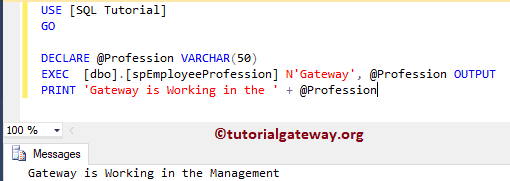
Here, we declare a variable called @LastName as input parameter, and @EmployeeProfession of Varchar type as an Output parameter. Within the procedure, we are finding the Occupation of an employee whose last name is equal to the input parameter. Next, we are assigning the value to the Output parameter.
OUTPUT

Let me execute the stored procedure. Here, we have to pass the value for the @LastName as Gateway.
OUTPUT
Output Parameters in SQL Stored Procedure Example 3
Let us see how to use Output Parameters in a Stored procedure to return multiple outputs. Here, we declare a variable called @LastName as input parameter, and three Output parameter. Within the procedure, we are finding the Occupation, Education, and yearly Income of an employee whose last name is equal to the input parameter. Next, we are assigning the value to the Output parameter.
OUTPUT

Let me execute the stored procedure.
OUTPUT
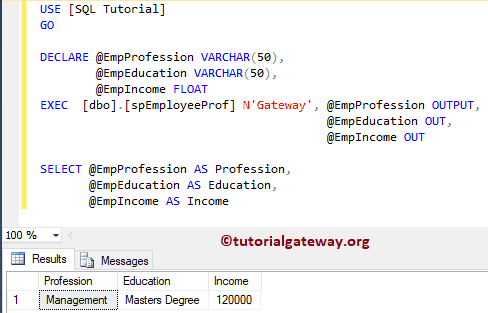
Let me show you, What will happen if you miss the OUTPUT keyword
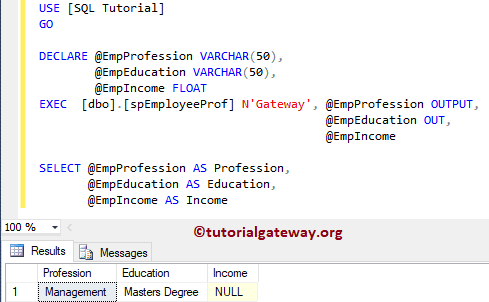
As you can see from the above screenshot, it is returning a NULL value. So, don’t forget the OUTPUT keyword.


