1. Главная страница » Компьютеры

Mac os хронология версий

Автор: | 16.12.2019

Mac OS X, безусловно, является программным совершенством и наглядным образцом того, как должна выглядеть лучшая в мире настольная операционная система. Но она далеко не всегда была такой. Весь тернистый путь становления от System 1.0 и до macOS 10.14 Mojave в этом материале.

Впервые операционная система Mac OS была представлена в 1984 году наряду с выпуском первого компьютера Macintosh.

Первый Macintosh (1984 год):

Mac OS (Macintosh Operating System) оказалась в числе первых ОС, предложивших пользователям удобный графический интерфейс вместо командной строки. С 1984 по 2001 годы свет увидели версии System 1 – Mac OS 9, которые принято считать классическими. С 2000 года операционная система получила наименование Mac OS X, а с 2016 — macOS.

System 1.0 (1984)

В версии System 1.0 Apple реализовала удобный для пользователей графический интерфейс. Уже в самой первой редакции ОС команда разработчиков смогла сделать понятное взаимодействие с элементами в оконном режиме. Фактически, более совершенные версии операционной системы отличаются от своего «предка» лишь качеством графики и более расширенным функционалом.

System 2.0 – 6.0 (1985-1988)

В этот период разработчики добавили дополнительные возможности, настройки и стандартные приложения, также появилась иерархическая файловая система. Особое внимание создатели операционной системы уделяли ее адаптации под новые комплектующие и устройства. В частности, разработчики позаботились о поддержке слотов расширения, периферийных устройств, новых процессоров и более емких накопителей. Отметим, что полноценная панель многозадачности появилась только в версии System 5.

System 3.0

System 4.2

System 6.0

System 7.0 – 7.6 (1991-1996)

Первое масштабное обновление ОС получила только через семь лет существования. Апгрейд принес цветной интерфейс, хотя многие элементы по-прежнему оставались серыми, некоторые из них были цветными. Разработчики значительно усовершенствовали режим многозадачности. В последующих обновлениях Apple устраняла ошибки, добавляла поддержку новых компонентов, реализовывала новые программы, как собственные, так и от сторонних разработчиков программного обеспечения.

System 8 (1997)

Данная редакция была выпущена летом 1997 года после того, как Стив Джобс вновь присоединился к Apple. Изначально предполагалось, что новая версия продолжит традицию и выйдет под нумерацией 7.7, однако Джобс принял иное решение. В то время пользователи могли устанавливать System 7 на компьютеры других производителей. Apple решила прекратить подобную практику и перестала выпускать System 7. Именно с тех пор «яблочная» ОС устанавливается исключительно на устройства Apple. За первые две недели после выхода System 8, компания продала 1,2 млн копий, а в последующие шесть месяцев реализовала еще три миллиона. Примечательно, что System 8 претерпела лишь немногочисленные изменения. Например, компания добавила больше цветов и оттенков в элементы интерфейса и снабдила ОС новыми темами оформления и панелью управления.

Mac OS 9 (1999)

23 октября 1999 года купертиновцы выпустили версию Mac OS 9, ставшую последним обновлением классических Mac OS. Пользователи данной редакции получили возможность хранить свою информацию и устанавливать системные настройки. В числе нововведений также следует отметить появление шифрования данных по технологии Keychain, возможность работы с удаленными серверами и усовершенствованную поддержку USB-протокола. 5 декабря 2001 года состоялся релиз последнего обновления Mac OS 9.2.2.

Mac OS X 10.0 Cheetah (2000)

Первая публичная бета-версия OS X стала доступна 13 сентября 2000. Стоимость дистрибутива составляла $30. Официальная версия появилась через полгода.

24 марта 2001 года состоялся релиз первой официальной версии OS X 10.0. Apple решила сделать кардинальный шаг от классического восприятия операционных систем Macintosh. Был продемонстрирован совершенно новый пользовательский интерфейс Aqua. Впервые использовались такие приложения как TextEdit, Просмотр, Почта и QuickTime.

Cheetah была очень требовательна к железу: 128 МБ оперативной памяти (неофициальный минимум 64 МБ) и 800 МБ свободного дискового пространства (желательно 1,5 ГБ) в то время были предметом роскоши. В последующем из-за таких жёстких требований к памяти OS X 10.0 подверглась критике (стандартным объёмом памяти в Macintosh было 64 МБ RAM).

Mac OS X 10.1 Puma (2001)

Второй крупный запуск Mac OS X произошёл всего через полгода — 25 сентября 2001 года. Владельцы OS X 10.0 могли обновиться до OS X 10.1 совершенно бесплатно. С этих пор купертиновская мегакорпорация сделала Mac OS X операционной системой устанавливаемой по умолчанию на всех новых компьютерах.

Основной упор был сделан не на новые возможности, а на улучшение производительности системы. Появилась более удобная запись CD и DVD, поддержка воспроизведения DVD. Увеличилось количество поддерживаемых принтеров (более 200), OpenGL (3D-графика) начала работать на 20% быстрее, а также был внедрён AppleScript. Появились программы ColorSync 4.0 (управление цветом) и Image Capture (работа с изображениями на цифровых камерах и сканерах).

Со всеми своими преимуществами Mac OS X Puma подверглась довольно серьёзной критике. В основном операционную систему журили за недостаточную производительность, низкую надёжность и функциональность. Проделанной работы было недостаточно для того, чтобы использовать OS X 10.1 в качестве основной операционной системы.

Mac OS X 10.2 Jaguar (2002)

Добавлены новые приложения, такие как iChat и Адресная книга. Сделан большой шаг в сторону людей с ограниченными возможностями. Появилась стартовая заставка: вместо счастливого Mac стал отображаться логотип Apple в виде фрукта.

Mac OS X 10.3 Panther (2003)

Руководители компании Microsoft были несколько озадачены, так как Apple решила отказаться от Internet Explorer для Mac в пользу собственного браузера Safari, с другой стороны — OS X 10.3 добавила множество улучшений в области взаимодействия системы с Microsoft Windows (даже появилась поддержка службы каталогов Active Directory).

Немаловажным нововведением стало внедрение технологии Exposé, в которой можно перемещать мешающие окна и удалять их за пределы экрана.

Mac OS X 10.4 Tiger (2005)

В OS X добавлен фирменный поиск Spotlight и виджеты (календарь, калькулятор, часы и другие). Появилась поддержка нового оборудования, в том числе процессоров Intel и телеприставки Apple TV.

Mac OS X 10.5 Leopard (2007)

Между запусками «Тигра» и «Леопарда» прошел самый длительный период времени. И это понятно, ведь Apple была занята запуском первого iPhone с оригинальной мобильной операционной системой.

Mac OS X Leopard стала по-настоящему многозадачной многопользовательской операционкой. Из основных нововведений стоит отметить поддержку 64-битных приложений и появление утилиты для резервного копирования данных Time Machine. Немаловажным новшеством стала возможность установки операционных систем сторонних разработчиков при помощи утилиты Boot Camp.

Mac OS X 10.6 Snow Leopard (2009)

Основной задачей перед разработчиками стало повышение производительности и удобства при использовании новой ОС. Произошёл полный отказ от архитектуры PowerPC («Снежный леопард» работает только на процессорах Intel). Система стала полностью 64-разрядной, как и большинство её приложений.

Стоимость Snow Leopard для новых пользователей составляла $129 и $29 для пользователей Leopard. Если компьютер был приобретён с установленной Leopard в период с 8 июня по 26 декабря 2009 года, то обновиться до OS X 10.6 можно было всего за $9,95.

Mac OS X 10.7 Lion (2011)

Восьмая по счёту ОС в линейке OS X получила свыше 250 новых функций. Что ж, на трон сел царь зверей. За первый день продаж было скачано свыше 1 миллиона копий. Дистрибутив распространялся через Mac App Store за $29,99. Кстати, Lion стала первой операционной системой не распространяемой на CD и DVD дисках. Появились жесты многозадачности, Launchpad, функция «Возобновить», Lion Recovery Disk Assistant (восстановление системы) и многое другое.

Впервые был внедрён сервис облачного хранения данных iCloud.

Mac OS X 10.8 Mountain Lion (2012)

Руководство компании Apple решило выпустить Mountain Lion годом ранее, чем планировалось, тем самым сократив цикл разработки с двух до одного года (скорее всего на данный шаг сподвигнул скорый запуск конкурирующей Windows 8). Настольная версия начала перенимать фирменные возможности iOS: появились Центр уведомлений, Заметки, напоминания, iChat был заменён iMessage. Произошла более тесная интеграция с iCloud. Всего было интегрировано свыше 200 новых функций. Mountain Lion стала последней операционной системой из семейства кошачьих.

Mac OS X 10.9 Mavericks (2013)

Начиная с OS X 10.9, Apple перешла на новую систему подбора названий для своих настольных ОС. Отныне имена берутся из памятных мест Калифорнии. Mavericks — популярный пляж. Важным шагом Apple для составления конкуренции стала возможность бесплатного обновления на OS X 10.9 и последующие версии. Из нововведений стоит отметить поддержку нескольких мониторов, тегов, Связки ключей iCloud, а также интеграцию приложений Карты и iBooks.

Mac OS X 10.10 Yosemite (2014)

Операционная система, названная в честь Йосемитского национального парка, получила кардинально новое оформление с интеграцией плоского интерфейса и эффектами прозрачности как в iOS 7 / iOS 8. Появилась революционная функция Handoff, в которой, к примеру, начав печатать текст в Pages на iOS, можно было мгновенно продолжить работать на Mac. Функция Continuity позволяет принимать и совершать звонки прямо с Mac.

Mac OS X 10.11 El Capitan (2015)

В данной версии разработчики в основном сосредоточились на улучшении стабильности и производительности ОС. Платформа не получила каких-либо крупных улучшений, ограничившись большим числом мелких изменений. Разработчики модернизировали ряд приложений, в том числе Safari, Spotlight, «Почта» и «Заметки», но при этом упростили функционал менее используемых программ, в частности, Дисковой утилиты.

macOS 10.12 Sierra (2016)

С выпуском macOS 10.12 Sierra Apple переименовала Mac OS X в macOS. В данной версии появилась поддержка виртуального ассистента Siri, платежной системы Apple Pay. Кроме того, у пользователей появилась возможность разблокировать Мас с помощью смарт-часов Apple Watch.

macOS 10.13 High Sierra (2017)

25 сентября 2017 года состоялся релиз macOS 10.13 High Sierra (обзор). В основном данное обновление лишь незначительно отличается от предыдущего. Одними из главных нововведений стали новая файловая система APFS и реализация новой версии технологии Metal 2.

macOS 10.14 Mojave (2018)

Операционную систему macOS Mojave (обзор), традиционно для последних лет названную в честь калифорнийской достопримечательности, представили публике 4 июня 2018 года на конференции WWDC-2018.

В рамках презентации Крейг Федериги ответил на главный вопрос, интересовавший публику — станет ли Apple объединять мобильную и десктопную ОС по примеру Microsoft Windows? Ответ — нет, компания по-прежнему будет разрабатывать две отдельные системы в соответствии со спецификой работы iГаджетов и компьютеров Mac, но отныне разработчики смогут относительно легко и удобно портировать приложения с iOS на macOS и обратно.

В качестве примера в новой macOS Mojave появились мобильные программы Акции, Новости, Дом и Диктофон. Кроме того, в macOS Mojave был реализован долгожданная Темная тема оформления для комфортной работы с интерфейсом в темное время суток, обновлен магазин приложений Mac App Store, реализованы групповые вызовы FaceTime, в Finder появилось новое меню Быстрые действия и т.д.

Версию операционной системы компьютера Mac и сведения о ее актуальности можно найти в разделе «Об этом Mac».

Установлена ли на вашем компьютере Mac последняя версия операционной системы (macOS или OS X)? Отвечает ли эта версия требованиям продукта или функции? Какие версии более ранние (старые) или более поздние (новые), чем установленная версия? Для этого узнайте, какая версия установлена в настоящее время.

Если используемая версия macOS не актуальна, можете установить более позднюю.

Какая версия macOS установлена?

В меню Apple () в углу экрана выберите пункт «Об этом Mac». Вы увидите название macOS, например macOS Mojave, и номер версии. Если для продукта или функции требуется определенный номер сборки, нажмите номер версии, чтобы узнать его.
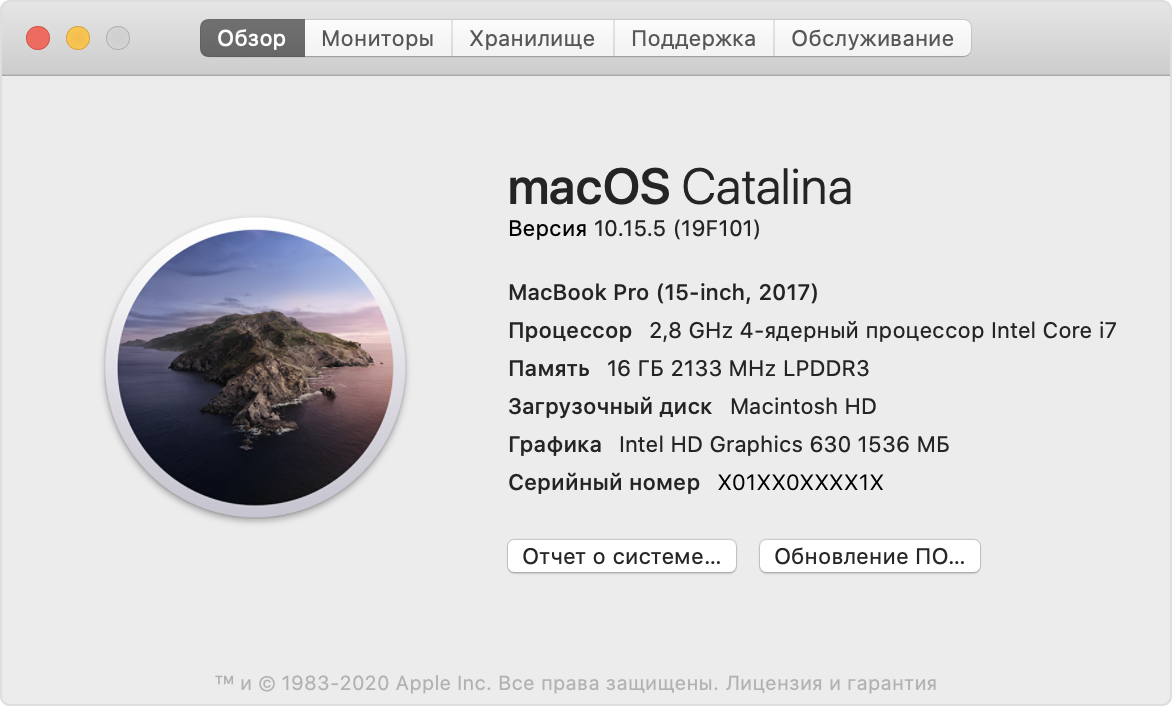
В данном примере показана macOS Catalina 10.15 (сборка 19A583).

Какая версия macOS последняя?

Ниже перечислены все операционные системы Mac, начиная с самой последней. Каждый эталонный выпуск macOS получает новое название, например macOS Catalina. Актуальные версии macOS добавляются в эту статью по мере выхода соответствующих обновлений.

Если на компьютере Mac установлена более старая версия любой операционной системы Mac, необходимо установить последние обновления ПО Apple, в состав которых могут входить важные обновления системы безопасности и обновления программ, устанавливаемых с помощью macOS, например Safari, «Книги», «Сообщения», «Почта», «Музыка», «Календарь» и «Фото».

The history of macOS, Apple’s current Mac operating system originally named Mac OS X until 2012 and then OS X until 2016, began with the company’s project to replace its "classic" Mac OS. That system, up to and including its final release Mac OS 9, was a direct descendant of the operating system Apple had used in its Macintosh computers since their introduction in 1984. However, the current macOS is a Unix operating system built on technology that had been developed at NeXT from the 1980s until Apple purchased the company in early 1997.

Although it was originally marketed as simply "version 10" of the Mac OS (indicated by the Roman numeral "X"), it has a completely different codebase from Mac OS 9, as well as substantial changes to its user interface. The transition was a technologically and strategically significant one. To ease the transition, versions through 10.4 were able to run Mac OS 9 and its applications in a compatibility layer.

It was first released in 1999 as Mac OS X Server 1.0, with a w >[1] [2] [3] [4] [5]

macOS has retained the major version number 10 throughout its development history to date; releases of macOS have also been named after big cats (versions 10.0–10.8) or locations in California (10.9–present).

Contents

Development [ edit ]

Development outside Apple [ edit ]

After Apple removed Steve Jobs from management in 1985, he left the company and attempted to create the "next big thing", with funding from Ross Perot [6] and himself. The result was the NeXT Computer. As the first workstation to include a digital signal processor (DSP) and a high-capacity optical disc drive, NeXT hardware was advanced for its time, but was expensive relative to the rapidly commoditizing workstation market and marred by design problems. The hardware was phased out in 1993; however, the company’s object-oriented operating system NeXTSTEP had a more lasting legacy.

NeXTSTEP was based on the Mach kernel developed at CMU (Carnegie Mellon University) [7] and BSD, an implementation of Unix dating back to the 1970s. It featured an object-oriented programming framework based on the Objective-C language. This environment is known today in the Mac world as Cocoa. It also supported the innovative Enterprise Objects Framework database access layer and WebObjects application server development environment, among other notable features.

All but abandoning the idea of an operating system, NeXT managed to maintain a business selling WebObjects and consulting services, but was never a commercial success. NeXTSTEP underwent an evolution into OPENSTEP which separated the object layers from the operating system below, allowing it to run with less modification on other platforms. OPENSTEP was, for a short time, adopted by Sun Microsystems. However, by this point, a number of other companies — notably Apple, IBM, Microsoft, and even Sun itself — were claiming they would soon be releasing similar object-oriented operating systems and development tools of their own. (Some of these efforts, such as Taligent, did not fully come to fruition; others, like Java, gained widespread adoption.)

On February 4, 1997, Apple Computer acquired NeXT for $427 million, and used OPENSTEP as the basis for Mac OS X, as it was called at the time. [8] Traces of the NeXT software heritage can still be seen in macOS. For example, in the Cocoa development environment, the Objective-C library classes have "NS" prefixes, and the HISTORY section of the manual page for the defaults command in macOS straightforwardly states that the command "First appeared in NeXTStep."

Internal development [ edit ]

Meanwhile, Apple was facing commercial difficulties of its own. The decade-old Macintosh System Software had reached the limits of its single-user, co-operative multitasking architecture, and its once-innovative user interface was looking increasingly outdated. A massive development effort to replace it, known as Copland, was started in 1994, but was generally perceived outside Apple to be a hopeless case due to political infighting and conflicting goals. By 1996, Copland was nowhere near ready for release, and the project was eventually cancelled. Some elements of Copland were incorporated into Mac OS 8, released on July 26, 1997.

After considering the purchase of BeOS — a multimedia-enabled, multi-tasking OS designed for hardware similar to Apple’s, the company decided instead to acquire NeXT and use OPENSTEP as the basis for their new OS. Avie Tevanian took over OS development, and Steve Jobs was brought on as a consultant. At first, the plan was to develop a new operating system based almost entirely on an updated version of OPENSTEP, with the addition of a virtual machine subsystem — known as the Blue Box — for running "classic" Macintosh applications. The result was known by the code name Rhapsody, slated for release in late 1998.

Apple expected that developers would port their software to the considerably more powerful OPENSTEP libraries once they learned of its power and flexibility. Instead, several major developers such as Adobe told Apple that this would never occur, and that they would rather leave the platform entirely. This "rejection" of Apple’s plan was largely the result of a string of previous broken promises from Apple; after watching one "next OS" after another disappear and Apple’s market share dwindle, developers were not interested in doing much work on the platform at all, let alone a re-write.

Changed direction under Jobs [ edit ]

Apple’s financial losses continued and the board of directors lost conf >[ citation needed ] , he was met with thunderous applause. Over the next two years, major effort was applied to porting the original Macintosh APIs to Unix libraries known as Carbon. Mac OS applications could be ported to Carbon without the need for a complete re-write, making them operate as native applications on the new operating system. Meanwhile, applications written using the older toolkits would be supported using the "Classic" Mac OS 9 environment. Support for C, C++, Objective-C, Java, and Python were added, furthering developer comfort with the new platform.

During this time, the lower layers of the operating system (the Mach kernel and the BSD layers on top of it [9] ) were re-packaged and released under the Apple Public Source License. They became known as Darwin. The Darwin kernel prov >[ citation needed ] . During this period, the Java programming language had increased in popularity, and an effort was started to improve Mac Java support. This consisted of porting a high-speed Java virtual machine to the platform, and exposing macOS-specific "Cocoa" APIs to the Java language.

The first release of the new OS — Mac OS X Server 1.0 — used a modified version of the Mac OS GUI, but all client versions starting with Mac OS X Developer Preview 3 used a new theme known as Aqua. Aqua was a substantial departure from the Mac OS 9 interface, which had evolved with little change from that of the original Macintosh operating system: it incorporated full color scalable graphics, anti-aliasing of text and graphics, simulated shading and highlights, transparency and shadows, and animation. A key new feature was the Dock, an application launcher which took advantage of these capabilities. Despite this, OS X maintained a substantial degree of consistency with the traditional Mac OS interface and Apple’s own Apple Human Interface Guidelines, with its pull-down menu at the top of the screen, familiar keyboard shortcuts, and support for a single-button mouse. The development of Aqua was delayed somewhat by the switch from OpenStep’s Display PostScript engine to one developed in-house that was free of any license restrictions, known as Quartz.

Releases [ edit ]

With the exception of Mac OS X Server 1.0 and the original public beta, the first several macOS versions were named after big cats. Prior to its release, version 10.0 was code named "Cheetah" internally at Apple, and version 10.1 was code named internally as "Puma". After the code name "Jaguar" for version 10.2 received publicity in the media, Apple began openly using the names to promote the operating system: 10.3 was marketed as "Panther", 10.4 as "Tiger", 10.5 as "Leopard", 10.6 as "Snow Leopard", 10.7 as "Lion", and 10.8 as "Mountain Lion". "Panther", "Tiger", and "Leopard" were registered as trademarks, and Apple registered "Lynx" and "Cougar", but these were allowed to lapse, [10] with Apple instead using the name of iconic locations in California for subsequent releases: 10.9 Mavericks is named after Mavericks, a popular surfing destination; 10.10 Yosemite is named after Yosemite National Park; 10.11 El Capitan is named for El Capitan; 10.12 Sierra is named for the Sierra Nevada mountain range; and 10.13 High Sierra is named for the area around the High Sierra Camps.

Public Beta: "Kodiak" [ edit ]

On September 13, 2000, Apple released a $29.95 [11] "preview" version of Mac OS X (internally codenamed Kodiak) in order to gain feedback from users. [12] It marked the first public availability of the Aqua interface, and Apple made many changes to the UI based on customer feedback. Mac OS X Public Beta expired and ceased to function in spring 2001. [13]

Version 10.0: "Cheetah" [ edit ]

On March 24, 2001, Apple released Mac OS X 10.0 (internally codenamed Cheetah). [14] The initial version was slow, incomplete, and had very few applications available at the time of its launch, mostly from independent developers. While many critics suggested that the operating system was not ready for mainstream adoption, they recognized the importance of its initial launch as a base on which to improve. Simply releasing Mac OS X was received by the Macintosh community as a great accomplishment, for attempts to completely overhaul the Mac OS had been underway since 1996, and delayed by countless setbacks. Following some bug fixes, kernel panics became much less frequent.

Version 10.1: "Puma" [ edit ]

Mac OS X 10.1 (internally codenamed Puma) was released on September 25, 2001. [15] It has better performance and prov >US$129 upgrade CD for Mac OS 9.

On January 7, 2002, Apple announced that Mac OS X was to be the default operating system for all Macintosh products by the end of that month. [16]

Version 10.2: "Jaguar" [ edit ]

On August 23, 2002, [17] Apple followed up with Mac OS X 10.2 Jaguar, the first release to use its code name as part of the branding. [18] It brought great raw performance improvements, a sleeker look, and many powerful user-interface enhancements (over 150, according to Apple [19] ), including Quartz Extreme for compositing graphics directly on an ATI Radeon or Nv >[20] The Happy Mac which had appeared during the Mac OS startup sequence for almost 18 years was replaced with a large grey Apple logo with the introduction of Mac OS X 10.2.

Version 10.3: "Panther" [ edit ]

Mac OS X Panther was released on October 24, 2003. In addition to prov >[21] Support for some early G3 computers such as the Power Macintosh and PowerBook was discontinued.

Version 10.4: "Tiger" [ edit ]

Mac OS X Tiger was released on April 29, 2005. Apple stated that Tiger contained more than 200 new features. [22] As with Panther, certain older machines were no longer supported; Tiger requires a Mac with a built-in FireWire port. Among the new features, Tiger introduced Spotlight, Dashboard, Smart Folders, updated Mail program with Smart Mailboxes, QuickTime 7, Safari 2, Automator, VoiceOver, Core Image and Core V >[23] Only PowerPC Macs can be booted from retail copies of the Tiger client DVD, but there is a Universal DVD of Tiger Server 10.4.7 (8K1079) that can boot both PowerPC and Intel Macs.

Version 10.5: "Leopard" [ edit ]

Mac OS X Leopard was released on October 26, 2007. It was called by Apple "the largest update of Mac OS X". Leopard supports both PowerPC- and Intel x86-based Macintosh computers; support for the G3 processor was dropped and the G4 processor required a minimum clock rate of 867 MHz, and at least 512 MB of RAM to be installed. The single DVD works for all supported Macs (including 64-bit machines). New features include a new look, an updated Finder, Time Machine, Spaces, Boot Camp pre-installed, [24] full support for 64-bit applications (including graphical applications), new features in Mail and iChat, and a number of new security features. Leopard is an Open Brand UNIX 03 registered product on the Intel platform. It was also the first BSD-based OS to receive UNIX 03 certification. [1] [25] Leopard dropped support for the >[26] and was the final version of Mac OS X to support the PowerPC architecture.

Version 10.6: "Snow Leopard" [ edit ]

Mac OS X Snow Leopard was released on August 28, 2009, the last version to be available on disc. Rather than delivering big changes to the appearance and end user functionality like the previous releases of Mac OS X , the development of Snow Leopard was deliberately focused on "under the hood" changes, increasing the performance, efficiency, and stability of the operating system. For most users, the most noticeable changes are these: the disk space that the operating system frees up after a clean installation compared to Mac OS X 10.5 Leopard, a more responsive Finder rewritten in Cocoa, faster Time Machine backups, more reliable and user friendly disk ejects, a more powerful version of the Preview application, as well as a faster Safari web browser. An update introduced support for the Mac App Store, Apple’s digital distribution platform for macOS applications and subsequent macOS upgrades. [27] Snow Leopard only supports machines with Intel CPUs, requires at least 1 GB of RAM, and drops default support for applications built for the PowerPC architecture (Rosetta can be installed as an additional component to retain support for PowerPC-only applications). [28]

Version 10.7: "Lion" [ edit ]

Mac OS X Lion was released on July 20, 2011. It brought developments made in Apple’s iOS, such as an easily navigable display of installed applications (Launchpad) and (a greater use of) multi-touch gestures, to the Mac. This release removed Rosetta, making it incapable of running PowerPC applications. It dropped support for 32-bit Intel processors and requires 2GB of memory. Changes made to the GUI (Graphical User Interface) include the Launchpad (similar to the home screen of iOS devices), auto-h >[29] Apple also made changes to applications: they resume in the same state as they were before they were closed (similar to iOS). Documents auto-save by default.

Version 10.8: "Mountain Lion" [ edit ]

OS X Mountain Lion was released on July 25, 2012. It incorporates some features seen in iOS 5, which include Game Center, support for iMessage in the new Messages messaging application, and Reminders as a to-do list app separate from iCal (which is renamed as Calendar, like the iOS app). It also includes support for storing iWork documents in iCloud. 2GB of memory is required. [30] Notification Center, which makes its debut in Mountain Lion, is a desktop version similar to the one in iOS 5.0 and higher. Application pop-ups are now concentrated on the corner of the screen, and the Center itself is pulled from the right s >[31] Notification Center is added, prov >[32] [33] through the iCloud service. Messages, an instant messaging software application, [34] replaces iChat. [35]

Version 10.9: "Mavericks" [ edit ]

OS X Mavericks was released on October 22, 2013, as a free update through the Mac App Store worldw >[36] It placed emphasis on battery life, Finder enhancements, other enhancements for power users, and continued iCloud integration, as well as bringing more of Apple’s iOS apps to the OS X platform. iBooks and Apple Maps applications were added. Mavericks requires 2GB of memory to operate. It is the first version named under Apple’s then-new theme of places in California, dubbed Mavericks after the surfing location. [37] [38] Unlike previous versions of OS X, which had progressively decreasing prices since 10.6, 10.9 was available at no charge to all users of compatible systems running Snow Leopard (10.6) or later, [39] beginning Apple’s policy of free upgrades for life on its operating system and business software. [40]

Version 10.10: "Yosemite" [ edit ]

OS X Yosemite was released to the general public on October 16, 2014, as a free update through the Mac App Store worldwide. It featured a major overhaul of user interface, replaced skeuomorphism with flat graphic design and blurred translucency effects, following the aesthetic introduced with iOS 7. It introduced features called Continuity and Handoff, which allow for tighter integration between paired OS X and iOS devices: the user can handle phone calls or text messages on either their Mac or their iPhone, and edit the same Pages document on either their Mac or their iPad. A later update of the OS included Photos as a replacement for iPhoto and Aperture.

Version 10.11: "El Capitan" [ edit ]

OS X El Capitan was revealed on June 8, 2015, during the WWDC keynote speech. [41] It was made available as a public beta in July and was made available publicly on September 30, 2015. Apple described this release as containing "Refinements to the Mac Experience" and "Improvements to System Performance" rather than new features. Refinements include public transport built into the Maps application, GUI improvements to the Notes application, as well as adopting San Francisco as the system font. Metal API, an application enhancing software, had debuted in this operating system, being available to "all Macs since 2012". [42]

Version 10.12: "Sierra" [ edit ]

macOS Sierra was announced on June 13, 2016, during the WWDC keynote speech. The update brought Siri to macOS, featuring several Mac-specific features, like searching for files. It also allowed websites to support Apple Pay as a method of transferring payment, using either a nearby iOS device or Touch >[43]

Version 10.13: "High Sierra" [ edit ]

macOS High Sierra was announced on June 5, 2017, during the WWDC keynote speech. It was released on September 25, 2017. The release includes many under-the-hood improvements, including a switch to Apple File System (APFS), the introduction of Metal 2, support for HEVC v >[44]

Version 10.14: "Mojave" [ edit ]

macOS Mojave was announced on June 4, 2018, during the WWDC keynote speech. It was released on September 24, 2018. Some of the key new features were the Dark mode, Desktop stacks and Dynamic Desktop, which changes the desktop background image to correspond to the user’s current time of day. [45]

Version 10.15: "Catalina" [ edit ]

macOS Catalina was announced on June 3, 2019, during the WWDC keynote speech. It was released on October 7, 2019. It primarily focuses on updates to built-in apps, such as replacing iTunes with separate Music, Podcasts, and TV apps, redesigned Reminders and Books apps, and a new Find My app. It also features S >[46] [47]

Part of a series on
macOS

Добавить комментарий

Ваш адрес email не будет опубликован. Обязательные поля помечены *