Во время работы с Cydia Impactor у вас может возникнуть та или иная ошибка, о которой программа сообщит вам на экране компьютера.
В этой статье мы собрали для вас номера наиболее распространенных ошибок Cydia Impactor, а также способы их устранения.
Cydia Impactor не видит iPhone, iPad или iPod touch

Решение:
- Обновите Cydia Impactor и ITunes.
- Перезагрузите компьютер.
- Попробуйте на другом ПК или ОС.
provision.cpp:62
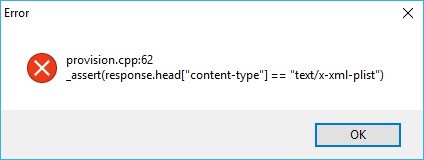
Решение:
- Попробуйте еще раз!
- Создайте новый AppleID.
provision.cpp:68
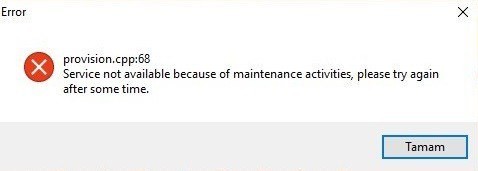
Решение:
- Попробуйте позже. Cydia Impactor не может связаться с серверами Apple.
- Отключите Антивирус или брандмауэр на вашем компьютере.
provision.cpp:71
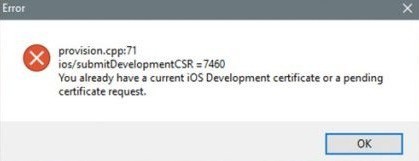
Решение:
- Обновите Cydia Impactor.
- Отмените сертификаты. Откройте Cydia Impactor, нажмите на меню Xcode и выберите, Revoke certificates, Введите AppleID и пароль.
provision.cpp:80
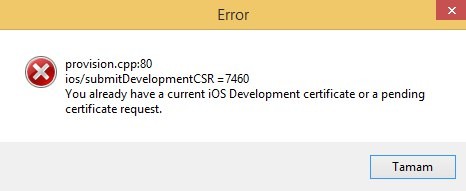
Решение:
- Отмените сертификаты. Откройте Cydia Impactor, нажмите на меню Xcode и выберите, Revoke certificates, Введите AppleID и пароль.
- Создайте новый AppleID.
provision.cpp:81

Решение:
- Отмените сертификаты. Откройте Cydia Impactor, нажмите на меню Xcode и выберите, Revoke certificates, Введите AppleID и пароль.
- Создайте новый AppleID.
- Установите через Device -> Instal Package. В появившемся окне выбирите ipa файл LazyTool.
- Поэкспериментируйте с запуском Импактора. Попробуйте от имени администратора, в режиме совместимости с Windows 7 (для владельцев Windows 810).
provision.cpp:150
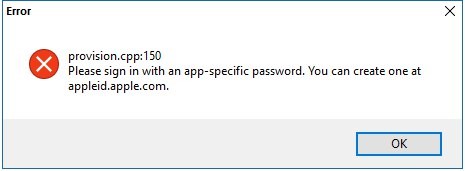
Решение:
- Создайте "Специальный пароль". Авторизуйтесь на сайте AppleID. В разделе безопасности веб-сайта нажмите на "Создать пароль ". Введите любое название (например "LazyTool") и нажмите "Создать". Скопируйте новый пароль. Теперь по запросу Cydia Impactor ввести пароль Apple ID, используйте скопированный пароль.
provision.cpp:168

Решение:
- Создайте "Пароль приложения". Авторизуйтесь на сайте AppleID. В разделе безопасности веб-сайта нажмите на "Создать пароль ". Введите любое название (например "LazyTool") и нажмите "Создать". Скопируйте новый пароль. Теперь по запросу Cydia Impactor ввести пароль Apple ID, используйте скопированный пароль.
provision.cpp:173 и provision.cpp:172

Решение:
- Создайте "Пароль приложения". Авторизуйтесь на сайте AppleID. В разделе безопасности веб-сайта нажмите на "Создать пароль ". Введите любое название (например "LazyTool") и нажмите "Создать". Скопируйте новый пароль. Теперь по запросу Cydia Impactor ввести пароль Apple ID, используйте скопированный пароль.
lockdown.cpp:57

Решение:
- Запустите программу в режиме совместимости с Windows 7. Правой кнопкой мыши по Impactor.exe -> Свойства -> Совместимость -> Запустить программу в режиме совместимости с Windows 7 -> OK
- Отключите Антивирус или брандмауэр на вашем компьютере. Закройте программы которые Вы используете или перезагрузите компьютер.
- Попробуйте на другом ПК или ОС.
progress.hpp:87

Решение:
- Отмените сертификаты в Cydia Impactor 0.9.43. Загрузите Cydia Impactor v.0.9.43 и последнюю версию Cydia Impactor на компьютер. Распакуйте обе версии по папкам на рабочий стол. Откройте Cydia Impactor 0.9.43, нажмите на меню Xcode и выберите, Revoke certificates, Введите AppleID и пароль и ОК. Выделите и скопируйте (с заменой) все файлы кроме "impactor.exe" из папки Impactor версии 0.9.43 в папку куда распаковали последнюю версию Cydia Impactor. Теперь установите LazyTool через последнюю версию Cydia Impactor.
Installer.cpp:62

Решение:
- Сначала необходимо удалить приложение LazyTool с вашего устройства, потом установить!
installation:cpp:42
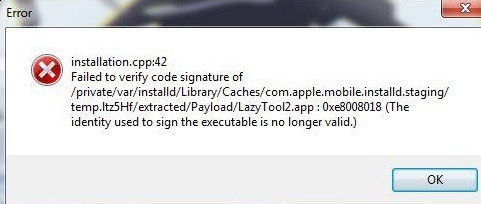
Решение:
- Убедитесь, что время и дата установлены на вашем компьютере правильно. Иногда случается, что Cydia Impactor не может правильно аутентифицироваться.
- Смените имя устройства на английские буквы.
- Создайте новый AppleID.
installer.cpp:71

Решение:
- Сначала необходимо удалить приложение LazyTool с вашего устройства, потом установить!
http-win.cpp:158 и http-win.cpp:159
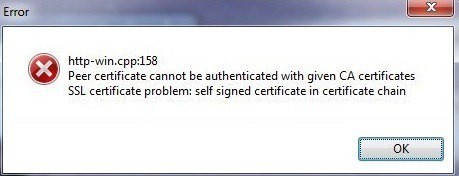
Решение:
- Обновите Cydia Impactor.
- Отключите Антивирус или брандмауэр на вашем компьютере.
http-win.cpp:160

Решение:
- Попробуйте позже. Cydia Impactor не может связаться с серверами Apple.
- Отключите Антивирус или брандмауэр на вашем компьютере.
http-win.cpp:182

Решение:
- Открыть импактор, нажать на Impactor -> Insecure SSL.
- Переустановитьобновить iTunes.
utility.cpp:185
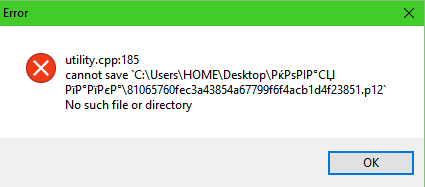
Решение:
- Cydia Impactor не понимает русские буквы в именах директорий, переместите Cydia Impactor на диск С или другое место где путь не содержит кириллицу.
Problem with the SSL CA cert (path? access rights?) — ошибка такого содержания встречается при использовании https, чаще всего при попытке скачать какой-либо файл, доступный по ссылке с https при помощи wget или обратиться к нему используя curl.
Ошибка может возникнуть, например, при выполнении такой команды:
$ sudo curl https://example.com/install.sh | sh
% Total % Received % Xferd Average Speed Time Time Time Current
Dload Upload Total Spent Left Speed
0 0 0 0 0 0 0 0 —:—:— —:—:— —:—:— 0
curl: (77) Problem with the SSL CA cert (path? access rights?)
Problem with the SSL CA cert (path? access rights?) — как устранить ошибку
Если попытаться скачать тот же файл (и перенаправить результат в шел как в примере или просто скачать) по http никакой ошибки не возникнет и файл скачается нормально. Из этого следует, что в системе не хватает определенных компонентов.
Их нужно установить от имени пользователя root или с использованием sudo
openssl — является самой популярной утилитой для шифрования данных, с ее помощью среди прочего генерируются SSL сертификаты
ca-certificates — именно тот компонент, которого не хватало для корректного выполнения запроса к https сайту, после установки ошибки больше не повторяются.
В примере приведенном выше ошибки возникла из-за того, что библиотеки не были установлены в системе, которая является LXC контейнером о чем говорит hostname машины — container. Также и на железных серверах возможно появление ошибки, устраняется она тем же образом — установкой openssl и ca-certificates.

If you search for “How to use Cydia Impactor” you’ll find many results. Some instructors about using Cydia Impactor on iOS emulators to test first. But a lot of these results don’t explain how to get around some of the errors you can encounter.
While installing, I ran into a few very frustrating errors.
So I decided it was time for an ultimate guide on the subject. A guide that takes you through all the steps and takes into account some of the problems you could encounter while using Cydia Impactor.
But first, why would you need Cydia Impactor on your phone?
To replace Jailbreak. And install apps outside of the App Store. In other words, install “IPA” files on your iOS device.
So without further ado, let’s dive into installing and using this amazing piece of software.
What Is Cydia Impactor?
As mentioned above, Cydia Impactor allows you to install IPA files on iOS. It works on Windows, Mac, and Linux.
There’s also a program called Cydia Eraser that lets you wipe your phone while preserving your OS. It was originally also named Cydia Impactor, but the name changed to prevent confusion.
How to Use Cydia Impactor
Use Cydia Impactor really easy and fast. You can choose & install any Cydia Impactor apps have on Apple Store by downloading IPA files on the website here
Requirements For Cydia Impactor
Before installing Cydia Impactor, make sure you…
- …have a val >Cydia Impactor Download
You’ll want to head to the official website here or download Cydia Impactor from here, and download file for your specific OS.
It’s not a huge app, so your download should be done pretty quickly.
How To Install IPA Packages On Your iOS Device
After downloading and installing Cydia Impactor and your chosen IPA file/s, follow these easy steps:
Step 1
Connect your device to your PC. When your PC recognizes your device, simply drag your IPA file onto the Cydia Impactor window to install.

Step 2
Enter your Apple ID and Password.

Step 3
Once the package installs successfully, go to Settings > General > Profiles & Device Management in your iOS device. Look for your latest Cydia Impactor IPA file install there and select “Trust”.
One thing worth mentioning is that some certificates are valid for 7 days only. Others for a year. If you want longer certificate validity, you may want to jailbreak your device.
Different Versions Of iOS Require Different Solutions
To get the app onto your PC is simple. But getting it onto your iPhone can be a bit of a task, depending on your version of iOS.
Make sure of your version below, then use the appropriate action to get Cydia Impactor working.
To check your version, go to Settings > General> About and your version is displayed there.
I have to give credit to Pangu8 for the following steps. They’ve got great articles that helped me a ton. All these links go to their website.
iOS 12
You’ll need to use the Anzhuang jailbreak app installer for this one. You can find out exactly how to manage it here, thanks to Pangu8.
iOS 11.4 / 11.4.1
This is a tricky one. There doesn’t seem to be any jailbreak app installers that work on the final releases of these versions.
However, you can try to install a special version of Cydia. Some of the features may not work, but at least you’ll be able to use it.
Again, follow Pangu8’s guide. 11.4 is here and 11.4.1 is here.
iOS 11.3 / 11.3.1
Another tricky version (aren’t they all?). But Electra Jailbreak can help you to install a semi-untethered version of Cydia. Which means you will need to jailbreak from the app every time you boot.
On this subject, untethered means that you never have to Jailbreak – it’s already done right in the boot.
Anzhuang and Velonzy are also options here.
Find help for 11.3 here, and 11.3.1 here.
iOS 11.2.2 – 11.2.6
There’s a semi-untethered method available for 11.2.5 and 11.2.6 by using Yalong.
And then, again, Anzhuang and Velonzy are also options.
The guide for 11.2.2-11.2.4 can be found here, and 11.2.5 and 11.2.6 instructions are here.
iOS 11.1 / 11.1.2
According to Pangu8 (my trusted source for this whole section), we’re still waiting for Cydia’s update on this version. But it will run – with limited functionality.
I did the double check and it seems we’re still waiting for Saurik (creator of Cydia) to update.
But you can go ahead and install it with the Jailbreak apps. Let us know just how much functionality it has (we don’t have an iOS 11.1 device right now).
The guide for these versions is here.
iOS 11 & higher
At first, I thought this was a mistake on Pangu8’s website. But it seems that you cannot install Cydia on anything older than version 11. You could still install Cydia Impactor iOS 11 on your iPhone 5S (limited support for iOS 11+). But maybe it’s time for an upgrade?
You can find Pangu’s guide here. (to install Cydia, not to upgrade your phone 🙂 )
Now, you should have all you need to carry on from here. But in case you run into any errors, the following section should help. It contains some of the errors I ran into, as well as many that others have run into.
Cydia Impactor Errors & Fixes
Now we’re getting to the real meat of this article. Those error messages.
I was lucky enough to avoid many of these errors. But those I did experience were frustrating enough. I hope this helps you avoid that same frustration…
Stuck on Verifying Application
This error shows “Verifying Application” when the Cydia Impactor isn’t able to communicate the IPA file with your device. This happens for many different reasons. Please check the list below to fix it.
- Enable both for your device or computer to disconnect the internet.
- Disabled 2-step verification.
- You are only able to sign three apps for an account. Check to how many apps approved to your device. If it is three apps, you need to remove one and begin to install your IPA file.
- Try other IPA file or use Cydia Impactor on another computer.
- Update new version for Cydia Impactor
- Revoke certificates for apps you may have installed previously using Cydia Impactor.
- Hard reset your device
No such device error/doesn’t recognize iPhone or iPad
This is mostly when you plug your iPhone into your computer and Cydia just doesn’t pick it. In other words, Cydia remains blank.
A nice quick fix that seems to work is…
- Type (Win-Key) + (R)
- Enter “%ProgramFiles%Common FilesAppleMobile Device SupportDrivers”
- Right-click usbaapl64.inf, and select Install…
All done. It should work now.
Installed application is from a different account
Those who take up my advice on getting an upgrade could run into this one. It happens when you switch devices, but forget to re-install Cydia for your new phone.
A simple error, with a simple fix. Just re-install Cydia for your new phone and all should be well.
Cydia Impactor error 168
I found a few solutions online for this one. For example here . And they all said the same thing (plagiarism much?).
I’ve messed with the order here though based on what people found the most useful. By what they said, solution 1 or 2 should solve your problem. But I’ve included the other fixes too, just in case.
1. Set up an app-specific password
- Head over here and sign into your Apple ID.
- Scroll down to the Security section and click the edit button.
- Find “App Specific Passwords” and click on generate the password.
- Enter a password, copy it and use it whenever Cydia asks you for your password.
2. Install package
- Plug your iOS device into your computer
- Run Cydia Impactor
- Open the “Device” drop-down and click on “Install Package”
3. Revoke certificates
One problem could be that you have too many apps installed with Cydia. And that’s messed with your Apple ID.
It’s quick and easy to fix with Cydia though. Inside Cydia, click on the “Xcode” drop-down and select “Revoke Certificates”.
4. Other options
If nothing above has worked for you, you have two options left. Either create and use a new Apple ID or use a different computer.
It could be that there’s an issue with your Apple ID. Here’s a good article on how to create a new one if you’re not sure.
Else use a different computer. It could be there’s an issue with the one you’re using. If that doesn’t work, there could be a problem with your phone. But by this point, you should have found a working solution.
Cydia Impactor error 159
This is generally a windows error. And you have one of two options.
Update Cydia to the latest possible version. This has helped clear the error for a few people out there.
The second solution is far more drastic. And that’s running a different OS. So if you’re getting the error on your Windows PC, try Linux or even MacOS if you can.
It’s a desperate measure, but if the update doesn’t help it’s only other option out there – for now.
Cydia Impactor error 158
The pretty simple solution here. And that’s great news, as seemingly EVERYONE with a Windows PC experienced it at some point.
Saurik released a patch to clear this up. You can download it here, and that should fix the problem.
Alternatively, try re-installing the latest version of Cydia.
Cydia Impactor error 150
Here’s one I got. And it turns out it’s an easy fix. Clear it by using the #1 solution in error #168 – use an app-specific password.
Alternatively, you could disable two-factor authentication. I didn’t take this step though, but it was recommended to me. So if you decide to try it, let us know how it went?
Cydia Impactor error 81
This is Cydia Impactor provision cpp 81. Another one that can be solved by an already mentioned solution. Use #3 from error 168 above – revoke certificates.
In case you don’t want to scroll back up, here it is again:
Open Cydia > Open “Xcode” drop-down > Click “Revoke Certificates”.
That should sort out the problem. It usually happens when you’ve installed too many apps.
If this doesn’t solve the problem for you, however, you can try using this useful article.
Cydia Impactor error 87
This is quite a complicated error. One I ran into myself.
And this is where I almost ripped my hair out. Finally though, I found a great article from Yalu that got me through it.
The problem is, simply, that you need to revoke certificates. But some versions of Cydia didn’t do it properly.
So I had to install an older version, revoke the certificates, update the version and then it was smooth sailing.
I don’t believe this error is still a thing, but if you’re experiencing it check out the guide here.
Cydia Impactor error 57 lockdown
Again, there are many solutions proposed online for this one. But here are the top 3 that worked for users:
- Turn off your phone’s wifi before opening Cydia Impactor
- Close Cydia Impactor, log into iTunes and sync your phone, then close iTunes and re-open Cydia Impactor
- Simply close and re-open Cydia Impactor
Other proposed solutions, in case none of the above worked for you, are:
- Remove the passcode on your phone while using Cydia Impactor
- Try using a different cord to connect your phone
- When your iPhone prompts you on whether you should trust this PC, be sure to click “Trust”
- Revoke certificates
- Restart both your phone and PC
- Re-install Cydia Impactor
Cydia Impactor error 42
You could run into this one if you have too many unsigned apps installed.
Again, Yalu to the rescue. They’ve got a great article on how to fix this error here.
Cydia Impactor runtime error
Usually, on this one, you’ll get a c++ runtime error and a window explaining the error.
And if you’re lucky, this is a real easy fix. Simply reboot your computer!
If that doesn’t work, however, try the following:
- Clear your App Store cache (Click the “Top Charts” tab 10 times)
- Clear the RAM (Hold the Sleep/Wake button until “Sl >Http-win.cpp:160
If you’re experiencing this error, you have my sympathy. It’s a very complicated error with a complicated solution. At least in my eyes…
Github has this article that will guide you through what you need to do.
If you are having this error, and the article helped you, please let us know.
Alternatively, if you’ve already experienced and fixed this error, please let us know how you did it?
I’m sure there would be many, many grateful souls out there if you did.
Cydia Impactor error 182
The error 182 showed “Problem with the SSL CA cert (path? access rights)”. I have found some persons same this error. You can try steps to fix it:
– Click on Impactor Menu and choose SSL Insecure
– You also try to change your networks such as Wifi or Cellular Data. Maybe some apps requested specific password generated from the Apple ID website.
Cydia Impactor provision cpp 138 maxQuantity
When you got the error (provision.cpp:138maxQuantity), you can’t copy the IPA file to your iPhone via Cydia Impactor. Only update Cydia Impactor 0.9.44 or update new version, you will fix this.
Cydia Impactor error 173
Cydia Impactor update Xcode 7.3
I got a lot of comments and message to me about this error:
file: propovision.cpp, line: 81, what:
ios/listDevices = 3018
Please update to Xcode 7.3 or later to continue developing with your Apple ID.
I didn’t see any update or fix from Saurik at this time.
Reprovision develop by Matt has the same error (update Xcode 7.3). He’s currently traveling to Geneva, and won’t have much free time until next week, but he will fix this error soon. I hope I will find the reason to fix this error from him and fix it on Cydia Impactor.
I will update to fix this bug soon when I get a notification from Saurik or Matt. Please wait patiently for the new update.
In Conclusion
Jailbreaking your iOS device opens up a whole new world of awesome apps. But with all these problems one can run into, it can ruin the experience.
I hope this article has helped you to overcome any errors you were facing.
If so, please let us know what you were experiencing and which fix worked for you. Because that, in turn, will help other users to quickly narrow down and select their solution.
I take it you’re now successfully installing all sorts of apps on your phone. So I’ll leave you to it.

Hi readers, I am passionate about new Technologies, Computing and everything related to Computing. I came to this world not only to make mistakes but to be able to learn from every mistake, and be better every day.
Among my passions one of them is to be writing, permanently I do it in this blog where I share and add content that serves me, but it is for everyone.