
CCNP [Sec, DA] :: CCIE SP
воскресенье, 3 февраля 2013 г.
Статья для информации. Честно стырено отсюда
http://www.wellit.ru/reference/20.html
Authentication, Authorization, and Accounting (AAA) — Аутентификация, авторизация и акаутинг.
Аутентификация (Authentication) — предоставляет методы идентификации пользователей, включающие диалог "логин-пароль", вызовы и ответы, различные сообщения, зависящие от метода выбранного шифрования.
Авторизация (Authorization) — предоставляет методы для удалённого доступа, включающие одновременную авторизацию или авторизацию для каждого сервиса, пользовательские аккаунты и профили, пользовательские группы, поддержку IP, IPX, ARA и Telnet.
Аккаунтинг (Accounting) — служит для сбора и отправки информации на сервер. Используется для биллинга, аудита и отчётности. Может включать следующую информацию: идентификация пользователей, время остановки и запуска, запуск выполняемых команд (таких как PPP), число пакетов и количество байт.
Обзор конфигурации AAA
2. Если Вы решите использовать расширенные возможности security сервера, то сможете настроить использование параметров security протоколов, таких как RADIUS, TACACS+, или Kerberos.
3. Определите методы списков для аутентификации используя команду
aaa authentication .
4. Примените методы списков к отдельным интерфейсам или line, если это потребуется.
5. (Опционально) Настройте авторизацию, используя команду
aaa authorization .
6. (Опционально) Настройте аккаутинг, используя команду
aaa accounting .
Конфигурация Аутентификации.
Рассмотрим методы аутентификации:
1) Настройка Login аутентификации используя AAA
Выполняйте следующие команды в режиме глобального конфигурирования:
Router(config)# aaa new-model (Включение ААА)
Router(config)# aaa authentication login
Router(config)# line [aux | console | tty | vty] line-number [ending-line-number] (Вносит виды конфигурации line для списков аутентификации)
Router(config-line)# login authentication
Список поддерживаемых методов аутентификации при настройке login
enable Используется пароль enable для аутентификации.
krb5 Используется Kerberos 5 для аутентификации.
krb5-telnet Используется Kerberos 5 Telnet протокол аутентификации, когда используется Telnet для подключения к роутеру. Если выбрана эта аутентификация, то данный метод должен быть первым в списке методов аутентификации.
line Используется пароль line для аутентификации.
local Используется локальная база данных пользователей для аутентификации.
local-case Используется чувствительная к регистру локальная база данных пользователей для аутентификации.
none Не использовать аутентификацию.
group radius Использовать список всех RADIUS серверов для аутентификации.
group tacacs+ Использовать список всех TACACS+ серверов для аутентификации.
group group-name Использовать подмножество RADIUS или TACACS+ серверов для аутентификации, которая определена группой ааа radius сервера или группой сервера tacacs+
Примеры настройки видов аутентификации при методе login
Login аутентификация с использованием пароля Enable
aaa authentication login default enable
Login аутентификация с использованием пароля Kerberos
aaa authentication login default krb5
Login аутентификация с использованием пароля Line
aaa authentication login default line
Login аутентификация с использованием пароля Default
aaa authentication login default local
Login аутентификация с использованием группы RADIUS
aaa authentication login default group radius
Login аутентификация с использованием группы TACACS+
aaa authentication login default group tacacs+
Login аутентификация с использованием группы group-name
aaa group server radius loginrad
server 172.16.2.3
server 172.16.2 17
server 172.16.2.32
Настройка PPP аутентификации Используя AAA
Router(config)# aaa new-model (Объявление ААА в глобальной конфигурации)
Router(config)# aaa authentication ppp
(Создание локального списка аутентификации)
Router(config)# interface interface-type interface-number (Выбор интерфейса для сопоставления списка аутентификации)
Router(config-if)# ppp authentication
Список методов аутентификации для метода PPP
if-needed Не аутентифицировать, если пользователь уже аутентифицировался на TTY line.
krb5 Использовать Kerberos 5 для аутентификации (может быть использовано только с PAP аутентификацией)
local Использовать локальную базу данных пользователей для аутентификации.
local-case Использовать чувствительную к регистру локальную базу данных пользователей для аутентификации.
none Не использовать аутентификацию
group radius Использовать список всех RADIUS серверов для аутентификации.
group tacacs+ Использовать список всех TACACS+ серверов для аутентификации.
group group-name Использовать подмножество RADIUS или TACACS+ серверов для аутентификации, которая определена группой ааа radius сервера или группой сервера tacacs+
Более подробно методы аутентификации описаны на сайте производителя.
Авторизация: краткий обзор
Список названий методов для авторизации:
Auth-proxy — применяется на специфичных политиках безопасности относящихся к пользователям.
Commands — применяется для EXEC режима пользовательского диалога, включает команды глобального конфигурирования ассоциированная с различными типами уровней привилегий.
EXEC — применяется к командам ассоциированными с EXEC пользовательскими терминальными сессиями.
Network — применяется к сетевым подключениям. Может включать PPP, SLIP, или ARAP соединения.
Reverse Access — применяется к reverse Telnet сессиям.
Методы AAA авторизации
- TACACS+ — Сервер сетевого доступа, обменивающийся информацией об авторизации с TACACS+ security демоном. TACACS+ авторизовывает определёнными специфическими правами для пользователей с помощью ассоциированных атрибутов, пар атрибут-значение, которые хранятся в базе TACACS+ security сервера, с соответствующими пользователями.
- If-Authenticated — Пользователю открывается доступ к определённым функциям, если аутентификация прошла успешно.
- None — Сетевой сервер доступа не запрашивает запроса об авторизации; авторизация не применяется к line интерфейсу.
- Local — Роутер или сервер доступа обращается к локальной базе, как к определённой пользовательской команде, например, специфической авторизации прав пользователей. Только определённые функции могут быть ограничены с помощью локальной базы данных.
- RADIUS — Сервер сетевого доступа запрашивает информацию об авторизации от RADIUS security сервера. RADIUS авторизует определённые специфические права для пользователей с помощью ассоциированных атрибутов, которые хранятся в базе данных RADIUS сервера, с соответствующим пользователем.
Типы AAA авторизации:
Auth-proxy — применяется при специфичных политиках безопасности относящихся к пользователям.
Commands — применяется для EXEC режима пользовательского диалога, включает команды глобального конфигурирования, ассоциированными с различными типами уровней привелегий.
EXEC — применяется к командам, асоциированными с EXEC пользовательскими терминальными сессиями.
Network — применяется к сетевым подключениям. Может включать PPP, SLIP или ARAP соеденения.
Reverse Access — применяется к reverse Telnet сессиям.
Configuration — разрешается загрузка конфигураций с AAA сервера.
IP Mobile — разрешается авторизация для мобильных IP-сервисов.
Более подробно о методах и настройке авторизации можно прочитать на сайте производителя.
Аккаутинг. Краткий обзор:
Список методов аккаутинга:
- Network — предоставляет информацию по всем PPP, SLIP или ARAP сессиям, включает счетчик пакетов и байтов.
- EXEC — предоставляет информацию о пользовательских EXEC terminal сессиях для сетевого сервера доступа.
- Commands — предоставляет информацию о режимах EXEC команд вводимых пользователем. Command accounting генерирует все записи команд для всех EXEC режимов, включая команды глобального конфигурирования, ассоциированные с определённым уровнем доступа.
- Connection — предоставляет информацию обо всех исходящих соединениях сервера сетевого доступа, таких как Telnet, local-area transport (LAT), TN3270, пакетов assembler/disassembler (PAD), и rlogin.
- System — предоставляет информацию о сообщения системного уровня.
- Resource — показывает "start" и "stop" записи всех звонков, которые были пропущены пользовательской аутентификацией, и предоставляет "stop" записи для всех вызовов об ошибках аутентификации.
As per Cisco doc: Configure aaa session-id common to ensure the session ID is maintained across all authentication, authorization, and accounting packets in a session.
My question is why we need to keep the same session ID for all the above 3. What is the benefit of it?
Comments
As per Cisco doc: Configure aaa session-id common to ensure the session ID is maintained across all authentication, authorization, and accounting packets in a session.
My question is why we need to keep the same session ID for all the above 3. What is the benefit of it?
I think it’s used for the easier management of user events/logs by maintaining authentication, authorization & accounting in a single session-id which is the default mode for the Cisco IOS.
I’m not sure — but if i had to guess: it would be like the stateful versus stateless on a firewall (or router, anything that is monitoring access)
If a disconnection happens, then the same session ID can be used instead of a new session ID. Also, it would be helpful from logging perspective to see how many REAL new sessions were launched (as opposed to multiple session ID’s per actual flow)
The session ID is used to identify the client by the AAA server. Other use of it is for reporting, show commands and MIBs, etc.
This is a good question; I think the main reason is to keep the authentication/authorization/accounting of each device under the same session-id, so if you want to later on check something, all the stuff (authentication, authorization and accountign) for a particular client will be under the same session-id. This is default in IOS, if you want to change it you can use aaa session-id unique
Sent from my iPhone
This is a good question; I think the main reason is to keep the authentication/authorization/accounting of each device under the same session-id, so if you want to later on check something, all the stuff (authentication, authorization and accountign) for a particular client will be under the same session-id. This is default in IOS, if you want to change it you can use aaa session-id unique
INE — The Industry Leader in CCIE Preparation
Subscription information may be found at:
Is the highlighted ones are the session-ids?
R2#
*Mar 1 05:32:03.910: AAA/BIND(00000009): Bind i/f
*Mar 1 05:32:03.914: AAA/AUTHEN/LOGIN (00000009): Pick method list ‘default’
R2#
*Mar 1 05:32:09.978: AAA/AUTHEN/LOGIN (00000009): Pick method list ‘default’
R2#
*Mar 1 05:32:15.886: AAA/AUTHOR (00000009): Method list >
A particular client/user means a unique IP address..correct?
Is the highlighted ones are the session-ids?
R2#
*Mar 1 05:32:03.910: AAA/BIND(00000009): Bind i/f
*Mar 1 05:32:03.914: AAA/AUTHEN/LOGIN (00000009): Pick method list ‘default’
R2#
*Mar 1 05:32:09.978: AAA/AUTHEN/LOGIN (00000009): Pick method list ‘default’
R2#
*Mar 1 05:32:15.886: AAA/AUTHOR (00000009): Method list >
A particular client/user means a unique IP address..correct?
Yep; you are correct, that is the session-ids assigned to this specific client/IP
Howdy, Stranger!
It looks like you’re new here. If you want to get involved, click one of these buttons!
another www.yapchinhoong.com production
Saturday, March 24, 2012
AAA — Authentication, Authorization, and Accounting
Access control is the way to control who is allowed to access to the network devices, and what services are allowed to use once a user has been granted access (authenticated).
Authentication, Authorization, and Accounting (AAA) is the standard and common network access control security framework that has been widely implemented in Cisco networks.
Below briefly describes the functions and roles for each AAA service:
| Authentication | Validates the identity of a user using login and password prompting. |
| Authorization | Grants certain access privileges or rights to the services requested by the authenticated user. |
| Accounting | Provides auditing and logging functions to the security model. Tracks user access (eg: when, from where, what services have been accessed, what actions have been performed, what commands have been executed, when the command has been executed, how long the access has been lasted) in the network. Accounting records can be sent either to a remote AAA or Syslog server, and can be imported into a spreadsheet program for viewing. |
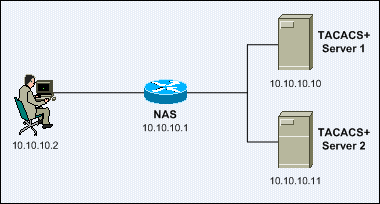
Below lists some acronyms for the main elements in AAA-based network access environment:
| NAS | Network Access Server. Act as a AAA client. |
| RADIUS | Remote Authentication Dial-in User Service. |
| TACACS+ | Terminal Access Controller Access Control System Plus. |
General AAA Configuration
Below shows the sample general AAA configuration:
The ip tacacs source-interface <type num> global configuration command specifies the IP address of an interface as the source address of the packets sent to the TACACS+ server. This ensures devices such as routers, which normally have many interfaces and IP addresses, use a specified IP address for all communications with the TACACS+ server. Additionally, the TACACS+ server uses an IP address to identify a particular device (or NAS).
Note: Normally loopback interface addresses (eg: Loopback0) would be used for routers and management interface addresses (eg: VLAN1) would be used for switches.
The tacacs-server host <ip-addr> global configuration command specifies a TACACS+ server. The tacacs-server key <key> global configuration command specifies the shared secret encryption key used for all communications between the NAS and the TACACS+ server.
Note: Multiple TACACS+ servers can also be implemented by defining a server group. However, this topic is out of the scope of this document.
The tacacs-server directed-request global configuration command configures a NAS to send only the username to a specified TACACS+ server, while the no-truncate option or the no form of this command will configure a NAS to send the whole string (both the username and hostname) to the default TACACS+ server. The directed-request mode is the default operation mode.
Example: username = root , hostname = 10.10.10.11 .
TACACS+ Servers: 10.10.10.10 (default), 10.10.10.11.
root@10.10.10.11 is entered as username upon the login prompt of a NAS.
With directed-request mode, the root will be sent as the username to 10.10.10.11.
With no truncate mode, root@10.10.10.11 will be sent as the username to 10.10.10.10.
Below shows the AAA Authentication debugging messages when root@10.10.10.10 is entered as username upon the login prompt of the NAS with the directed-request mode:
Below shows AAA Authentication debugging messages when root@10.10.10.10 is entered as username upon the login prompt of the NAS with the no-truncate mode. The authentication process failed because there is no such username – root@10.10.10.10 configured in the 10.10.10.10 TACACS+ server.
The aaa new-model global configuration command is used to enable and initialize the AAA access control service.
The aaa session-id <common | unique> global configuration command specifies whether the same or different session >common is the default mode.
Note: This command is only available for Cisco IOS Release 12.2 and later. Most workgroup and access layer switches (eg: Catalyst 3550, Catalyst 2950) do not support this command.
Below shows the output of the show aaa sessions and show aaa user all EXEC commands with the aaa session-id common in effect. It shows the same session ID was used for both the EXEC and NET AAA accounting service types.
Below shows the output of the show aaa sessions and show aaa user all EXEC commands with the aaa session-id unique in effect. It shows the different session ID was used for the EXEC and NET AAA accounting service types.
Below shows the sample AAA Authentication configuration:
The aaa authentication login <default | method-list-name> <method1> [method2…] global configuration command creates authentication method lists that define the authentication methods used to authenticate a user. An authentication method list is used in conjunction with the login authentication <method-list-name> line subcommand.
The configuration above first creates an authentication method list named local_console , which uses the local username database as the only authentication method. The authentication method list is then applied on the console ( con 0 ) with the login authentication <method-list-name> line subcommand.
The configuration above then creates another authentication method list named ssh_telnet , which uses the TACACS+ server group as the 1st method for user authentication. The local username database is used as the backup method in case all TACACS+ servers in the server group are unavailable. The authentication method list is then applied on the Telnet / SSH virtual terminals ( vty 0 4 ) with the login authentication <method-list-name> line subcommand.
Below shows the AAA Authentication debugging messages for the Console access to the NAS. The user root is granted access to the NAS via the console.
The local username database can be configured with the username <username> <password | secret> <password> global configuration command. Below shows the AAA Authentication debugging messages for the console access to the NAS with an unknown user:
Below shows the AAA Authentication debugging messages for the Telnet / SSH access to the NAS when the TACACS+ server is available:
Below shows the AAA Authentication debugging messages for the Telnet / SSH access to the NAS when the TACACS+ server is unavailable. An ERROR response is first received from the TACACS+ server. The NAS then tried the LOCAL authentication method.
Below shows the sample AAA Authorization configuration:
The aaa authorization exec <default | method-list-name> <method1> [method2…] creates authorization method lists that determine whether an authenticated user will be granted an EXEC shell.
The configuration above modifies the default EXEC authorization method list named default, which uses the TACACS+ server group as the 1st method, and the local database is used as the backup method in case all TACACS+ servers in the server group are unavailable.
Below shows the AAA Authorization debugging messages for the Telnet / SSH access to the NAS when the TACACS+ server is available. An EXEC shell is granted to the user.
EXEC shell authorization can be configured in a user group or an individual user basis. User authorization overrides group authorization.
The aaa authorization commands <privilege-level> <default | method-list-name> <method1> [method2…] global configuration command creates authorization method lists that determine whether to run authorization for all commands at the specified privilege level.
The aaa authorization commands 15 ssh_telnet group tacacs+ none global configuration command creates an authorization method list named ssh_telnet, which uses the TACACS+ server group as the 1st authorization method to authorize all privilege level 15 commands (eg: show running-config , configure terminal ). The none method, which means no authorization is performed, is used as the backup method in case all TACACS+ servers in the server group are unavailable.
The ssh_telnet command authorization method list is then applied on the Telnet / SSH virtual terminals ( vty 0 4 ) with the authorization commands <privilege-level> <method-list-name> line subcommand.
Below shows the AAA Authorization debugging messages when issuing the show running-config command (a privilege level 15 command) in the NAS when the TACACS+ server is available. The user root is authorized to execute the command.
Below shows the AAA Authorization debugging messages when issuing the show running-config privileged command (a privilege level 15 command) in the NAS when the TACACS+ server is unavailable. An ERROR response is first received from the TACACS+ server. The NAS then tried the NONE authorization method. Finally the command is authorized to be executed.
Shell command authorization can be configured in a user group or an individual user basis. User authorization overrides group authorization.
The aaa authorization config-commands global configuration command enables authorization for configuration commands. Configuration command authorization is disabled by default when the aaa authorization commands global configuration command is issued.
Below shows the AAA Authorization debugging messages when the user root issues the interface FastEthernet 0/1 global configuration command without configuration command authorization in effect:
Below shows the AAA Authorization debugging messages when the user root issues the interface FastEthernet 0/1 global configuration command with configuration command authorization in effect:
Below shows the sample AAA Accounting configuration:
The aaa accounting update newinfo global configuration command configures a NAS to send accounting records to the TACACS+ server whenever there is new accounting information to report. Additionally, another version of the command – aaa accounting update periodic <min> , configure a NAS to generate periodic accounting records continuously during active sessions, which can cause heavy congestion if many users are logged into the network.
The aaa accounting exec default start-stop group tacacs+ global configuration command configures a NAS to run accounting for both the start and stop of all the EXEC shell sessions in the NAS. The accounting records can be viewed via the TACACS+ Accounting Report.
Below shows the AAA Accounting debugging messages when the user root starts (after being authenticated) and stops an EXEC shell session.
The aaa accounting system default start-stop group tacacs+ global configuration command enables accounting for all system-level events not associated with users, eg: system reboots. Below shows the AAA Accounting debugging messages when the router is reloaded. The reload event record can be viewed via both the TACACS+ Accounting Report and TACACS+ Administration Report in the Cisco Secure ACS server.
The aaa accounting commands <privilege-level> <default | method-list-name> <start-stop | stop-only | none> group <radius | tacacs+ | server-group-name > global configuration command creates accounting method lists that determine whether to run accounting for all commands at the specified privilege level.
Below describes all the accounting notice methods:
| Method | Description |
| start-stop | Provides maximum accounting services. Sends a “start” and a “stop” accounting notice at both the beginning and the end of the requested process respectively. |
| stop-only | Provides minimal accounting services. Only sends a “stop” accounting notice at the end of the requested process. |
| none | Disables accounting services. |
The aaa accounting commands 15 default start-stop group tacacs+ global configuration command configures the NAS to run accounting for all privilege level 15 commands (eg: show running-config , configure terminal ) and send the accounting records to the TACACS+ server.
Below shows the AAA Accounting debugging messages when the user root issues the show running-config privileged command (a privilege level 15 command) in the NAS:


